Running the service
Workers
The processes that do the work — seeing them, pausing them, and getting stopped work moving again.
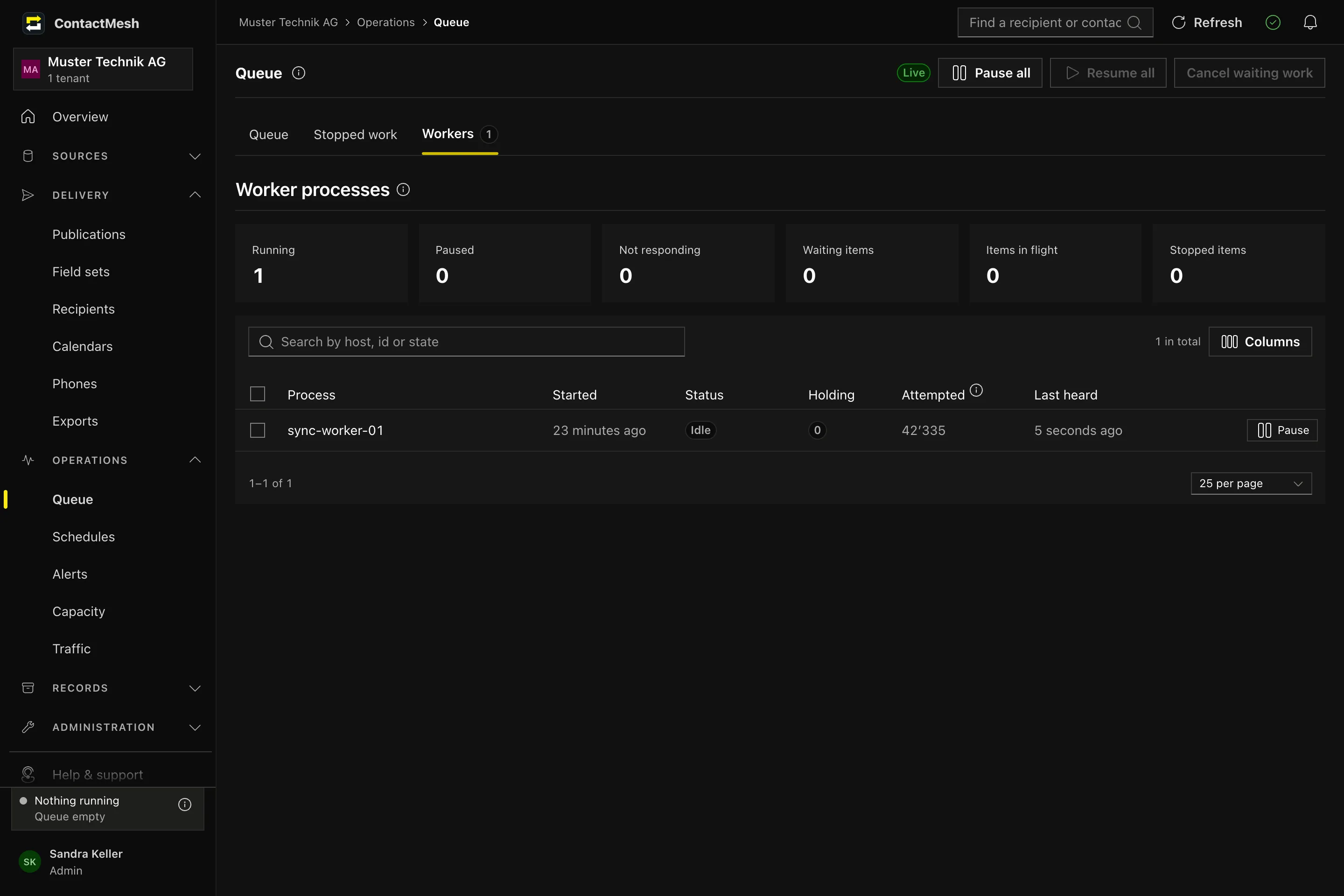
Everything ContactMesh writes is written by a worker process draining a queue. The Workers tab of Queue, under Operations, is where those processes are visible and where they are steered; the commands for all of them stand in the page’s header, and the work that stopped on its Stopped work tab.
The process list
Section titled “The process list”Each row is one worker process that has registered itself. It reports on every pass, so a worker with nothing to do is a row that says Idle rather than an absence — which matters, because the moment anybody opens this tab is usually when nothing is moving.
| Column | What it says |
|---|---|
| Process | The host it runs on. |
| Started | When this process came up, which tells two processes on one host apart. |
| Status | What it last reported. Not responding replaces it once the heartbeat goes quiet. |
| Holding | Items claimed right now. A lapsed lease is flagged: it is holding work it is no longer renewing. |
| Attempted | Items this process has taken on since it came up, counted once per attempt, so a retried item counts each time. The answer to “is it moving”. |
| Last heard | Time since its last report. |
Uptime, Last claim and Roles are behind Columns: how long it ran up to its last report, when it last claimed work, and the roles it runs — one container runs six. Every column sorts.
Processes that have ended and hold nothing are gathered into one row, Earlier processes, reading Shut down; Show lists them. They leave the list after an hour, or after a day if they went quiet without stopping.
Remove this record deletes a process’s row and nothing else. It is refused while the process is still reporting: a live process registers again on its next pass with its uptime reset, which reads like a crash that never happened.
Pausing
Section titled “Pausing”Pause asks a worker to finish what it is holding and then do nothing: no queued work, and none of the scheduled rounds — membership refresh, adoption, change checks, reconciliation, rollout progression — that also run in the worker. The other workers take over its rounds; with none running, nothing runs. A round under way stops at the next folder. A pause set on one process lasts as long as that process: a restarted worker is a new one and starts running. Pause all, in the header, does that to every process; Resume and Resume all undo it.
Pause all pauses the deployment rather than the processes on screen: it outlasts a restart, and a worker started afterwards stays paused. Resume all stays available for as long as that pause is in force, even when no worker in the table still reads paused.
While it is on, every folder reads Paused, whatever it would read otherwise, and Pause all is the first line under its badge, linking to the Workers tab. The rest of what holds a folder is still listed under it, for after Resume all. See the state ladder.
It holds the dashboard too. A button that would write to a mailbox, read a source or write an export — the permission probe and the marker round trip, Read changes on a source, Run now on an export, approving held deletions — answers that synchronisation is paused instead of starting. Queuing work is still accepted and waits for Resume all: a full sync, a booked check — Reconcile, Check changes and claiming contacts back among them — a Safe full re-read, a picture refresh, a restore from the lost and found, the decisions under Unmatched contacts, a tenant’s directory refresh. Comparisons and other reads keep working, so the screens stay useful while you look into whatever made you pause.
The dashboard’s heavy buttons hand their work to the worker instead of doing it themselves: Run now and Reconcile all, a folder’s or a recipient’s checks, a Safe full re-read, approving a source’s held deletions and refreshing every list’s memberships. They answer that the work is booked or queued, and the page shows the result once the worker has done it. A booked check or re-read waits for a worker; the others are refused while none is running. A recipient’s Check without syncing is the worker’s too, and is refused while none is running and through Pause all. So are a source’s Run probe and Read changes and a removed folder’s Remove folder, refused the same two ways, and applying the decisions under Unmatched contacts, refused while no worker is running and applied on Resume all when made during a pause. Refresh from Entra, Load from Entra and Refresh directory are read by the membership round, for one tenant or every one, the same way.
There is deliberately no stop button. A worker holding a batch has leases on real mailboxes, and dropping that mid-write leaves somebody’s Outlook half updated — the sweep can reclaim the items but cannot un-write what already went out. “Finish what is in hand and take nothing more” is the strongest instruction that is safe to give from a screen; stopping a process is what the container runtime is for.
While a worker is finishing its batch the row shows pausing after this batch, because a button that looks like it did nothing is how people stop trusting buttons.
Cancelling waiting work
Section titled “Cancelling waiting work”Cancel waiting work, in the header, cancels everything queued and everything backing off, and leaves anything in flight alone. Use it when a publication was pointed at the wrong source, or a rollout is being called off.
It is recoverable: the next reconciliation re-derives whatever is still wanted. But until that runs, the contacts it cancelled are missing from the folders they belong in.
Cancel stalled work cancels only the items whose lease has lapsed. The worker holding them stopped without finishing, so whatever it was writing has already landed or not; the next reconciliation queues again what is still wanted.
Both act on the tenant selected at the top; under All tenants they reach every tenant’s queue, and their question says Every tenant is included.
Work that stopped
Section titled “Work that stopped”The Stopped work tab: items that ran out of attempts, grouped by the reason they failed. Four hundred stopped items is usually one problem with four hundred instances, and the grouping is what says so.
The remedy is almost always outside ContactMesh — a permission granted, a folder recreated, a licence assigned. Retry these puts that group back in the queue with a full set of attempts. It is offered per reason rather than as one button on purpose: after fixing one recipient’s permissions, requeueing everything puts back hundreds of items that will fail again and buries the ones that would have succeeded.
Calendars
Section titled “Calendars”The calendar queue’s stopped work, under Calendars on the same tab, grouped by reason in the same way, shown while the licence includes Calendars or the calendar queue holds stopped work. Retry these puts the newest stopped item of each calendar back in the queue with a full set of attempts, closes the ones another item already covers, and skips a calendar that was taken back; a calendar whose work stopped no longer reads Stuck. There is no Give up here: a calendar’s own row on its publication’s Delivery tab has Send again. The bell’s Calendar operations stopped opens this group.