Running the service
The Overview
The one screen that answers "is anything wrong", and what each number on it means.
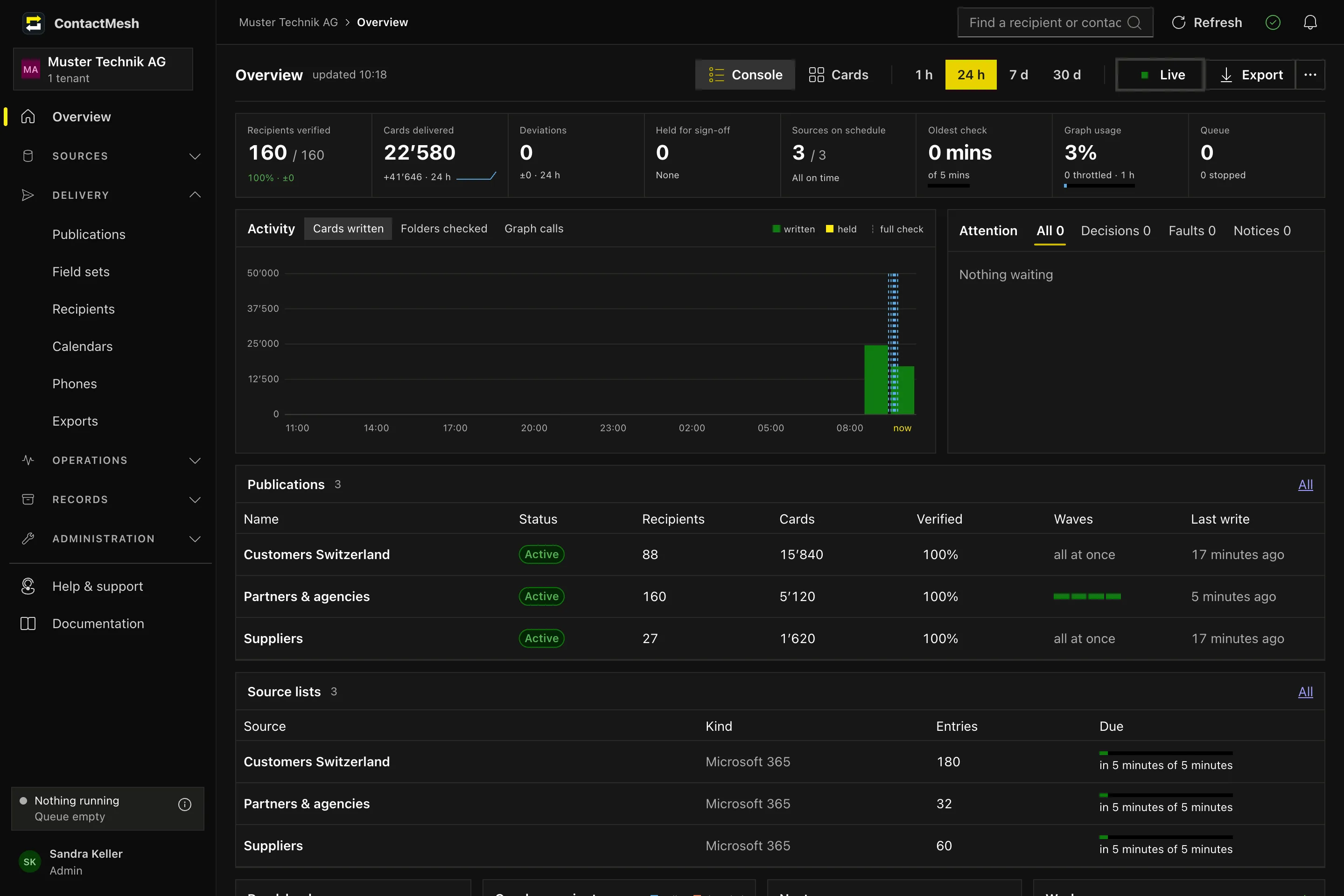
The Overview answers one question: is anything wrong. If the icon beside the bell says every folder is verified converged and Attention is empty, there is nothing to do here.
Get started
Section titled “Get started”Until a folder is verified, Get started stands at the top. It lists the steps a new installation still has to take — Tenant, Source list, Field set, Publication, Audience, Dry run, Delivery and Verified — each Done or To do, with a link to where an open step is done. Once a full listing finds a recipient’s folder as it should be, it goes away. Your first publication walks the same steps.
The console
Section titled “The console”The Overview is a console, every figure on one screen. 1 h, 24 h, 7 d and 30 d set the window the chart and each figure’s change are read over, Live stops and starts the reading, Export saves the figures and both tables as one CSV, and More leads to Traffic, Operations and Capacity.
A row of tiles follows, each a link to the page that acts on it: Recipients verified, Cards delivered, Deviations, Held for sign-off, Sources on schedule, Oldest check, Graph calls (Graph usage where a budget is set), and Queue, or Phones synced today once phones are enrolled. A tile is red when something failed (a source not read on schedule, a check past its publication’s interval, stopped work, deviating copies), orange when something falls short (recipients not yet verified, throttling, silent phones), yellow when something waits for a sign-off, and plain otherwise. Oldest check reads against the interval its own publication sets. Activity charts Cards written, Folders checked or Graph calls over the range, with quiet hours shaded and each full check marked. Attention is the bell’s list with every other fault the server finds, narrowed by All, Decisions, Faults and Notices: the bell’s rows with the verbs the bell offers, and a row for each other fault, how many and since when, with an i and Open (every fault and its tab). A notice is also a licence ending within 60 days or phones silent for seven. Then Publications and Source lists as tables, Read-back (Verified, Written, not listed and Deviating, with the last listing and the last full check), Graph per minute over the last hour, Next runs and the Worker processes. The live status, the workers answering, the database, the licence, a pause or plan mode, and the version stand in the status bar at the foot of every page; its status turns red while work has stopped or no worker answers.
Delivery, on every page
Section titled “Delivery, on every page”The headline also stands in the top bar of every page, as an icon beside the bell:
| Icon | Means |
|---|---|
| Red circle with an exclamation mark | A fault in at least one folder |
| Orange clock | Folders are behind, not yet synced, or slowed by Microsoft |
| Grey pause | A setting holds them: every folder paused, or nothing scheduled to check them |
| Green tick | Every folder is verified converged |
| Hollow circle | Nothing has verified the folders yet |
Its tooltip is the sentence. A click shows it with how many folders it is about, a few of this page’s figures — Recipients verified, Need attention, Copies written, Folders verified and the Queue — and when it was read, and Faults opens this page with Attention narrowed to Faults. With a tenant selected, it is that tenant’s.
What is waiting on you
Section titled “What is waiting on you”The bell at the top of every page counts what is waiting on a person. First, what stops sync outright: Pause all left on, no worker answering while work waits for one, tenants whose sign-in fails or whose certificate or client secret runs out within 14 days, tenants whose plan mode is holding writes, source lists and calendar sources whose last read failed, mailboxes outside the application’s scope, and calendars none was made of because the recipient already has a calendar of that name. Then the decisions nobody has made yet: publications awaiting sign-off, deletions held for review in folders and at source lists, contacts waiting for an adoption decision, staged plans, and rollouts paused on their wave’s failures. Last, stopped operations, calendars whose work stopped, the calendar queue’s stopped work, publications whose calendars hold recipients’ own appointments, and the other alerts nobody has acknowledged. Without the Calendars module the bell has no calendar items.
Each row opens to its items, the first ten, worst or newest first: what each one is, why it waits, and a link to the page it is dealt with on, with that page’s filter set. Where the bell can lift an item itself it offers the verb — Resume all, Check access again, Read changes on a source list whose last read failed, Retry these for one group of stopped work, Acknowledge — and Sign off and Review deletions open the publication’s sign-off dialog and the held set. Read changes books the read for the worker, as on the source’s page, and the source list leaves the bell once a read goes through. A verb your role may not use is shown disabled, with the role it needs. Show all opens the list that holds the rest. What the faults mean explains each fault and what to do about it.
The same counts stand beside Source lists, Publications, Recipients, Calendars, Queue, Alerts and Tenants in the navigation, and a closed section’s header carries its pages’ total. A deletion somebody has already approved is not counted while the worker carries it out, and a paused rollout is counted as itself rather than as an alert: acknowledging its alert does not resume it.