Reference
The audit trail
Who changed what, who signed in, what was refused, and what happened to a single contact.
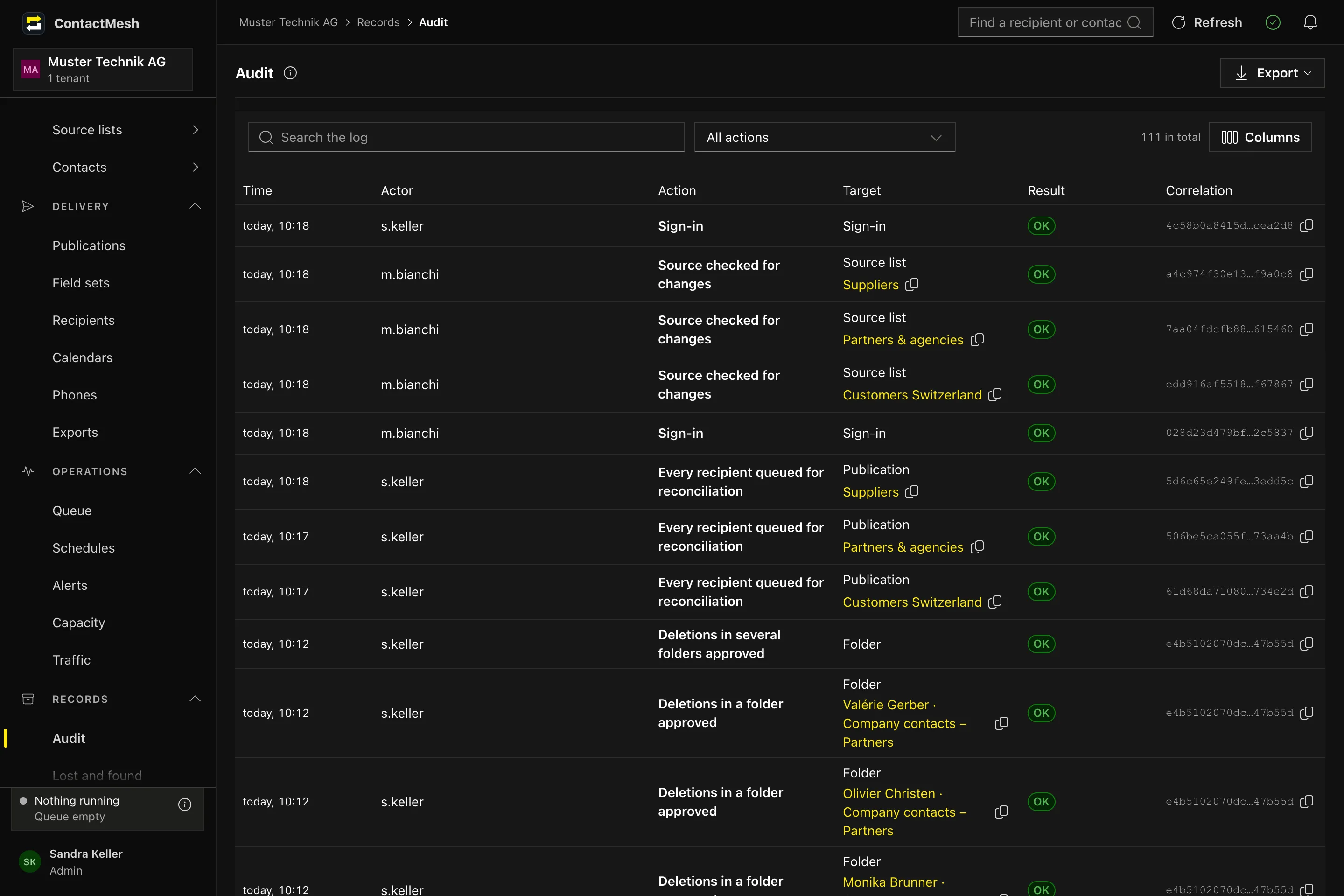
Two questions, two records.
Who changed the configuration — every mutating action, with the account, the moment and what changed. Publications carry a version history beside it: every version of the policy and its rules, with the difference against the one before or any older one, so “who narrowed this field set” has an answer (History).
Each event is filed under the tenant it acted on: whatever was created — a source list, a publication, a field set, an export — under its own, a request naming a tenant, such as a directory refresh, under that one, a lost and found selection under each tenant whose contacts it held, and a request for every tenant at once under none.
What happened to this contact — reachable from any contact, listing every write against every recipient’s copy, with what was sent, what Graph returned, and the request id. That last one is what makes a support case with Microsoft possible. What changed about the contact itself in its source, revision by revision, is its history (A contact’s history).
Both are kept for their own retention periods, set on Settings by an Admin; the audit trail is never kept for less than 90 days, and the rows that record a retention change are never swept at all.
The Audit screen is the Admin role’s to read (audit.read), and the navigation offers it to Admins
alone: it names every account’s sign-ins, lockouts and refusals. A role given in one tenant reads that
tenant’s entries. See Accounts and roles and
Roles and access.
What an entry records
Section titled “What an entry records”| A change | The account, the moment, the request’s route and its query parameter names, and the Result: OK, Refused or Failed. Never the body |
| A change that failed | Recorded with the answer it got, a server fault included |
| A refusal | Recorded whatever the method, reads included: under the account whose role does not reach, or under anonymous with nobody signed in. A record in a tenant the account holds nothing in is answered as absent and recorded as Not in a tenant they may see; a permission missing in the record’s tenant says Permission missing in the tenant |
| Deployment settings, retention, capacity, pausing everything, a schedule’s frequency | Each field that moved, with its value before and after. A field named for a secret is listed as changed, never by value |
| An account created, changed, reset or deleted | Its name, role, display name and whether it is enabled, before and after. A created account starts from nothing and a deleted one ends in nothing, so the entry keeps the name once the account is gone. A reset lists the password as changed, never by value |
| Access given back on the host | Access reset from the host, under host, about the account: whether it had been disabled or locked, and which second factors it removed |
| A second factor reset | Second factor reset, about the account, under the administrator: the reason given, and what it removed |
| A role made, changed or deleted | Its name, description and permissions, before and after |
| A role given or taken away | About the account or the group: the role, its holder, the tenant by name, when it ends and why. Filed under the tenant it applies in, so that tenant’s log shows it |
| A group made, renamed or deleted, a member added or taken out | Its name and description before and after, and each member by name. A deleted group’s entry counts its members and roles |
Reading the log
Section titled “Reading the log”Above the log, a summary counts what the filters keep: how many events, how many of them refused and failed, and by how many actors, with a bar for each stretch of the range, split by result — five minutes over the last hour, an hour over a day, six hours over a week, a day over a month. A bar’s tooltip names its stretch and its counts.
The log is one line an entry: Time to the second, Actor, Action, Target as its kind and its name, Result and the first eight characters of the Correlation. A value too long for its column is cut and is whole in its tooltip. Columns adds HTTP status and Route, and hides what you do not read.
A row opens the entry in a pane beside the log, in three groups. What: the action as it was recorded, the target and its ID, the result with its HTTP status, the time, and whatever the entry wrote beside them, such as why it was refused or what it changed. Who: the actor, the tenant, the hashed client address, the session and its roles. Request: the correlation ID, the trace ID, the route and its query parameters. Each ID has a button to copy it.
The search and the filters reach the whole log, not the page shown: Action, Actor (the most active in the range), Result (OK, Refused, Failed) and Time range (Last hour, Last 24 hours, Last 7 days, Last 30 days or All time, the default). The search finds a word in the account, the action, the target and its ID, the correlation ID and the route, and in the names the screen shows for records. All of them stay in the address, so a link keeps them.
Sign-ins
Section titled “Sign-ins”| A sign-in | Recorded under the account it signed in |
| A refused sign-in | Recorded under anonymous, about the account where the name is one’s, with the reason: no account by that name, wrong password, account disabled, account locked, too many attempts. The reason is in the entry only: the sign-in form answers every refusal alike. The name typed is never kept |
| A lockout | An entry of its own, Account locked, about the account, with the number of attempts allowed and the minutes it stays locked |
| Sessions ended | An entry of its own, Sessions ended, about the account, under whoever ended them, with how many and why: signed out by their person, ended by an administrator, too many sessions for the account, the password changed or reset, the account disabled or given another role, access reset from the host, its second factors reset, too many failed second steps |
| A session that had ended | A request brought it and was refused, under anonymous, with why: the session ended, past its length, idle too long, or signed out |
| Second factors | Each step of a sign-in and each factor added, renamed or removed is an entry of its own, with the reason a refused one was refused: a wrong or reused code, a wrong recovery code, a passkey not accepted. Beside them, entries of their own record a second factor added, new recovery codes, a recovery code used and how many are left, a code sent a second time, a right password followed by a failed second step, a factor switched off after a hundred wrong tries, a factor removed, and a passkey that answered as if copied. See Second factors and security |
| Confirming it’s you | Confirmed it was them, with how: a passkey, a code, a recovery code or the password. A change refused for want of a recent proof says Last confirmation too old |
| Microsoft Entra | The first request of a session, or the first after 30 minutes without one, is recorded as Signed in with Microsoft Entra, with the roles the token carries. A refused token says why: expired, not trusted, for another application, or without the dashboard’s scope |
| Where it came from | Every entry for a request to sign in or out, change a password or end one’s own sessions, the lock a sign-in sets off, and every Entra sign-in carry Client address (hashed): a hash of the address it came from, under a key the deployment derives from its protection key. The same address gives the same hash, so twenty refusals can be read as one guesser or as twenty people; the address itself is not stored, and the hash cannot be turned back into it without the key. A new protection key makes new hashes |
Requests with nobody signed in
Section titled “Requests with nobody signed in”With sign-in on, anything can send a request the API refuses. Those are recorded as one entry per client address, route, answer and minute: Requests this minute in its details says how many it stands for. The address itself is not stored; a sign-in’s entry carries its hash. A signed-in person’s refusals are each their own entry.
Refused sign-ins, locks, changes refused as not from the dashboard and sessions ended early are also
counted for monitoring: a sensor channel each, and counters on /metrics.
On standard output
Section titled “On standard output”Every entry is also a line in the log of the process that wrote it — the API’s, or the worker’s for its
sweep — event 8005, once it is saved; one saved inside a change that is undone is never a line. It says what was done, to what, how it was answered, the organisation and
the correlation ID, and for a sign-in why it was refused and the hash of its client. It does not name who
acted: a person is a tag there, actor- and eight characters, and the entry names them. A log stack that
collects standard output keeps a copy of the trail outside the database.
The retention sweep
Section titled “The retention sweep”The worker’s daily sweep is recorded under system as Retention sweep: how many rows it removed from each table, audit entries and lost-and-found cards included, and the windows it removed them by. A sweep that stopped before the end says so, with what it had removed by then.
The correlation ID
Section titled “The correlation ID”Every request has one, returned in the X-Correlation-ID header. Unless the caller sends its own, it is
the request’s trace ID: every line the request writes to the log carries it as TraceId, and
Help & support shows it on the problems the request left. A caller’s own ID is
kept, with the trace ID beside it in the entry’s details. A Run now carries it on to the run it
starts.
Export
Section titled “Export”Export, in the page’s header, saves the log as CSV or JSON Lines: every entry the screen lists, under
the organisation in scope, the one record it was opened for, the search and the filters, oldest
first. Only the Admin role may export; each export is itself an entry, Audit trail exported. The API takes from and to as well, for a time range:
GET /api/v1/audit-events/export?format=jsonl&from=2026-10-01T00:00:00Z.