Publishing contacts
Publications
Turning a source into contacts in people's mailboxes.
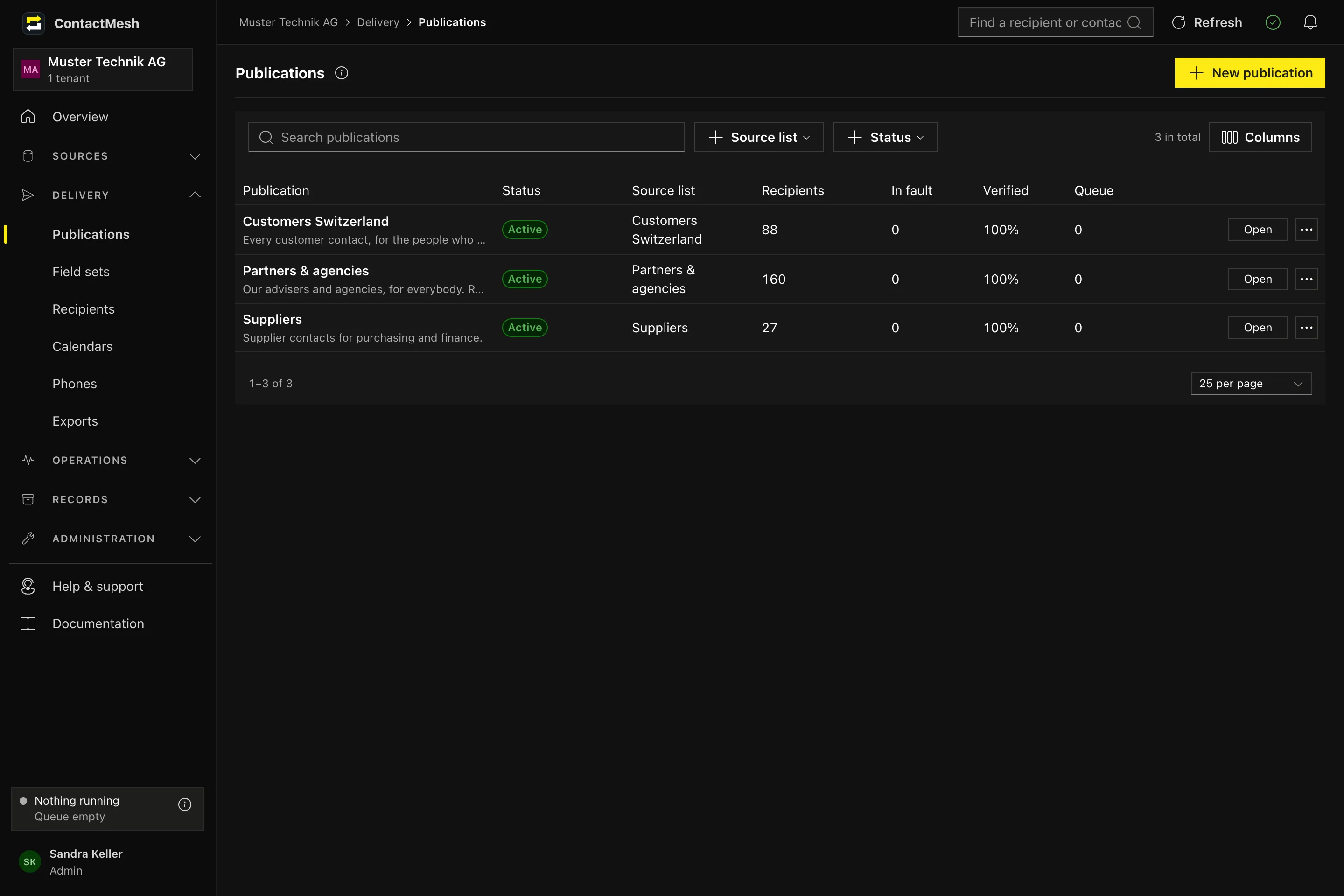
A publication says: this source, to these people, with these fields, under this folder name.
It delivers into its source’s tenant, so the source chooses the tenant: under All tenants, New publication lists the sources under each tenant’s name and chooses none of them for you.
Table or Cards at the top of the page shows the same publications as rows or as a card each: its name at the
top, the columns you show as its facts, its buttons at the foot. The choice is in the address, as layout=cards, and
this browser opens the page in the one last chosen.
A row of the list opens the publication in a pane beside the table: its state and the bar its page would show, how its delivery stands, and its facts. Open on the row, or Open its page at the pane’s head, goes to its page.
The delivery map
Section titled “The delivery map”A publication’s Delivery map tab reads left to right as the chain: the source list, which contacts pass the filters, how many mailboxes the audience resolves to, and the folder name each of them will see. The second stage names the rules rather than counting what survives them, and says Every contact when there are none.
Underneath, under Field access, one row per audience: the recipients it brings, the field set that applies, how many of the catalogue’s fields that delivers, and the highest sensitivity among them. When two audiences reach one person with different field sets, that person receives the union of both, and the union is the number to read. That rule sits behind the “i” beside the heading.
Dry runs
Section titled “Dry runs”Run dry run counts the creates, updates and deletes across the audience without writing anything to Graph.
The figures are an upper bound. A dry run never opens a mailbox — at two hundred recipients that would be two hundred folder listings inside one request — so a contact that already sits in somebody’s folder is counted here as a create, and is adopted rather than written again once the folder is read.
When device groups are in the audience, the dry run counts their phones too: for each group, its active phones, the contacts the publication would bring them through its filters and field set, and how many of those the phones would receive new, see changed, or lose. These are computed as the phones’ own sync computes them, so they are exact rather than an upper bound. A phone waiting for approval is not counted; it receives nothing until somebody approves it. The header’s caption adds the phones beside the mailboxes.
A dry run expires an hour after it is calculated, and any change to what gets published clears it: a preview of a configuration you have since edited is worse than none. Saving the rollout strategy is such a change, because it writes a new publication version.
The sign-off
Section titled “The sign-off”Delivery does not start without one. The delivery switch in the header hands off to a dialog carrying the figures the dry run reported, and the destination folder name has to be typed out to confirm — the one check that catches starting the publication you had open rather than the one you meant.
The dialog shows the phones beside the mailboxes, one row per device group, and only the phones when the audience is device groups alone. Where the version writes phone numbers otherwise than the one last signed off — a number format saved since — it lists those numbers too, before and after.
The signature records who gave it and carries a fingerprint of those figures, so a sign-off raised against numbers that have since moved is refused rather than applied to numbers nobody read. Resuming a publication that was paused does not ask again; that decision was taken — unless it was edited while it was paused, because the edit retired the signature. Then resuming queues the delivery and holds it, and the page says how many operations are waiting.
It guards every later edit too, not only the first delivery. Saving the settings of a publication that is already delivering retires the signature, so the delivery that edit queues is held rather than written, and the page says how many operations are waiting. Whatever else would write to its mailboxes waits with it — a contact changed at the source, a card the change check or a reconciliation would put back — because it would be written as the publication now stands, which is the edit. The mailboxes keep what was last signed off. Run the dry run, read the new figures and sign again: that releases everything that was held. Editing again does not release it, because every edit retires the review afresh. Taking data back is never held for a signature: a field you have just withheld still leaves the mailboxes, and a contact deleted at the source still goes.
The Changes tab, a publication’s first, shows the figures of this version’s dry run, the edit that made the version, and under Waiting changes what the signature would release: each contact, whether it would be created or updated, the recipient, and what holds it. It is read a page at a time and can be searched by contact or recipient; the figures beside its title count every one. The bar above every tab counts them too, and offers the sign-off.
Rollout
Section titled “Rollout”How many mailboxes the first delivery reaches at once, set on the Schedule & rollout tab. Every new publication starts in preview only.
| Mode | What it does | When to choose it |
|---|---|---|
| Preview only | Delivery cannot be switched on, so no rollout releases anybody | While the publication is still being written |
| Controlled waves | Recipients are released in batches of a fixed number of mailboxes | A first delivery to a large audience |
| Percentage waves | Each wave is a share of the audience rather than a count | The same, for an audience that keeps growing |
| All assigned members | Everybody in one wave, released when delivery starts | Small audiences, and re-activating something that has delivered before |
A publication whose audience is device groups and no mailbox starts without waves: there are no mailboxes to release, so activating it is all there is, and its phones receive its contacts at their next sync. The Schedule & rollout tab then reads Delivering without waves. The rollout mode still has to be something other than preview only. Mailboxes added to the audience later are delivered at once, as after a completed rollout; a publication with both mailboxes and device groups rolls out to the mailboxes in waves as usual, and its phones receive it as soon as it is active.
Preview only is not a read-only mode. It stops this publication being activated; folders it has already provisioned are still checked and repaired, and those checks reach mailboxes. Plan mode, on the tenant, is the setting that guarantees nothing is written at all — see Settings.
The other three settings on this tab — Unmatched contacts, Unmanaged contacts, Duplicate cards — are about what happens inside a folder, not about who gets one. They are covered in Contacts that were already there.
Wave size
Section titled “Wave size”Mailboxes per wave appears for controlled waves. It takes 1 to 5’000, and is clamped to the size of the audience, so a wave bigger than the audience is simply one wave.
Wave size (%) appears for percentage waves. It takes 1 to 100, rounds up, and never releases fewer than one recipient.
Only the control belonging to the selected mode is shown, and saving clears the other. Switching from controlled waves to percentage waves discards the count.
How waves are released
Section titled “How waves are released”Wave one goes out when delivery starts. Everybody else stays paused until their wave is released. Who lands in which wave is not a choice — recipients are ordered by their Entra user id and cut into waves of the configured size. No screen names who goes first.
Anybody who joins the audience mid-rollout is added to it at the next Entra audience refresh. On the last wave — which is every rollout of all assigned members — they receive at once; before it, they join the next wave; while the rollout is paused, they wait for it to run again. The Schedule & rollout tab lists them, marked joined mid-rollout.
A wave is released once the wave before it has converged. A scheduled pass looks at each running rollout every five minutes and releases the next wave when it is clean, so a rollout advances on its own. Release next wave is that same check on demand — it grades the wave that is out and releases the next only if nothing is still in flight, and says so when it released nothing. Under the progress bar, the Schedule & rollout tab lists the recipients the next wave is waiting on, failures first.
How each recipient in a released wave counts:
| Recipient | Counts as |
|---|---|
| Healthy, or needing attention, with no operations outstanding | Finished |
| Removed from the audience, or no longer eligible, once its offboarding has run | Finished, shown as left the audience |
| Failed, or failing to remove restricted fields | Failed — the rollout pauses |
| Paused, still syncing, or with operations outstanding | Waiting |
Needing attention is what a reconciliation reports for something the queue will not resolve — cards another tool left in the folder, a claim waiting for a person, deletions held for approval. It stays on that recipient’s page and the Overview; it does not hold every later wave. A recipient paused on purpose does hold its wave until it is resumed. A recipient who left the audience and comes back is released again straight away and counted like anyone else.
One failure stops it. If any recipient in the released wave is in error, the rollout is paused instead of advanced, and raises a critical alert naming the publication and the wave, with a link to this tab. A failed recipient is judged again on every pass, so once it has recovered, Resume rollout carries on. Under the wave, the tab says who paused the rollout and when, or how many failures did.
Three ways past a rollout, each for an Admin and each asked about first:
| Action | What it does |
|---|---|
| Go on past | For the failed recipients you tick. They stop holding the rollout, shown as gone on past, and keep receiving their retries; the rollout runs again once nothing else is failing |
| Release everyone now | Every remaining wave is released at once. The rollout completes once they converge |
| Complete rollout | On the last wave, or while paused. Everybody still held receives now and the rollout ends; failed recipients stay failed on their own page |
A paused rollout holds, whether it was paused by hand or by a failure. Recipients in waves it has not released stay paused through every Entra audience refresh, a resumed publication and a settings change, and the Recipients page refuses to resume them (wave not released); recipients it has released keep receiving updates.
A hold stops delivery, not privacy work. A held recipient who loses a field — a field set narrowed, or removed from the group that granted it — has that field cleared from the cards already in their mailbox, in the folder those cards are in, and nothing else is written. Everything else waits for the release, as it does under a paused publication: contacts deleted at the source and contacts a rule change now excludes stay in a held mailbox, updates do not reach it, and a renamed folder is created then. Until the release, the folder reads as behind.
A rollout skips a wave whose recipients were all released already, and completes once no later wave has anybody left to release. Completing delivers to everybody it was still holding straight away, not at the next audience refresh.
Switching delivery on again over a paused rollout — only possible through the API — starts a new rollout from wave one and marks the paused one superseded. Recipients the superseded rollout had released and the new one has not are held from that moment. A superseded rollout releases nobody, holds nobody back, raises no alert and cannot be resumed.
History
Section titled “History”Every change to a publication writes a version of it: its settings, its filters and transformations, its default field set, a rule set it follows. The History tab lists the versions newest first, each with what it did — the fields it changed, or the reason it was written — who wrote it and when. The version open is shown as a diff against the one before it, the way a contact’s revisions are (see A contact’s history): a value taken out on red behind a −, the value put in on green behind a +, the changed words of a replaced line marked. Values read as the tab that sets them says them, and a rule set or a pilot group by its name, with its id on the copy button. The filters and transformations are counted rather than compared rule by rule; the rules themselves are on the Contacts tab.
Compare with picks an older version instead, and the comparison is composed from the changes recorded between the two; Field follows one field through the versions that changed it. A version whose stored copy cannot be read is listed and says so. What it changed is not known, and it is not offered to compare with: the version after it was recorded against the last one that could be read.
The address names what is open — the version, the one it is compared with and the field followed, as in
?tab=history&version=4&compare=2 — so a link opens on it.
Pausing, archiving, deleting
Section titled “Pausing, archiving, deleting”A publication’s verbs are behind …, on its row in the list, in the pane a row opens and in its page’s header: Run dry run, Reconcile all, Pause or Resume, Duplicate publication, Archive, and for an archived publication Restore and Delete permanently. A verb with a button of its own beside the menu is left out of it: Run dry run and Reconcile all in the pane, Run dry run or Restore in the page’s header, Restore on an archived row and in its pane. The page also says pause and resume with its delivery switch. Each needs the permission its action needs, and a verb your role or the publication’s state does not allow stays in the menu and says why when you point at it.
Pause stops delivery and keeps everything: no further contact is written, and everything already delivered stays where it is. Archive ends it and keeps the record — delivery stops, nothing leaves a mailbox, and the publication comes off every schedule. Delete permanently is offered only once a publication is archived, and the two are deliberately separate steps: deleting one that is still live would stop its delivery and remove the record of it in the same click. Only an archived publication can be restored or deleted.
An archived publication leaves the list. The Archived chip above the table shows the archived ones, with their count, and is where their Restore and Delete permanently are; Current goes back. The chip is in the address, so a link opens on it. There, the Remains column says what still holds each one from its delete, or Nothing left.
Archiving holds what was still queued for the publication, as pausing does: nothing more is written into its folders, not even by a rollout’s next wave, and they read Paused. A hold stops delivery, not privacy work, so restricted fields still come off and an offboarding already under way still finishes.
Delete permanently is shut while anything still holds the publication, and says what, with counts:
- a recipient still subscribes, which includes one whose offboarding has not finished;
- a card in a mailbox is still recorded as this publication’s work;
- a device group still receives it.
Remove the audience so those recipients are offboarded under this publication’s removal behaviour — each folder deleted, emptied or stripped as that behaviour says — and remove its device groups, whose phones drop its contacts at their next sync. Then the row can go. The server refuses the same way, so a publication something took hold of after the menu opened is refused with the reason.
Nothing restores a deleted publication, so the dialog asks for its name to be typed back. The verb stays shut until the box holds the name exactly, in its own capitals; spaces before and after do not count.
An archived publication is skipped by the membership refresh, so an archive taken before the audience was removed cannot offboard anyone. Restore returns it to paused: remove the audience, let offboarding finish, archive it again and delete it. Restoring starts no delivery; resuming the restored publication delivers to its whole audience again. A device group can be removed from an archived publication’s audience without restoring it.
Both dialogs fetch the impact before they ask: recipients, contacts delivered, groups and individuals. Not a confirmation that says “are you sure”, one that says what it is about.