Publishing contacts
Source lists
Pointing ContactMesh at a contact folder, and what it does with it.
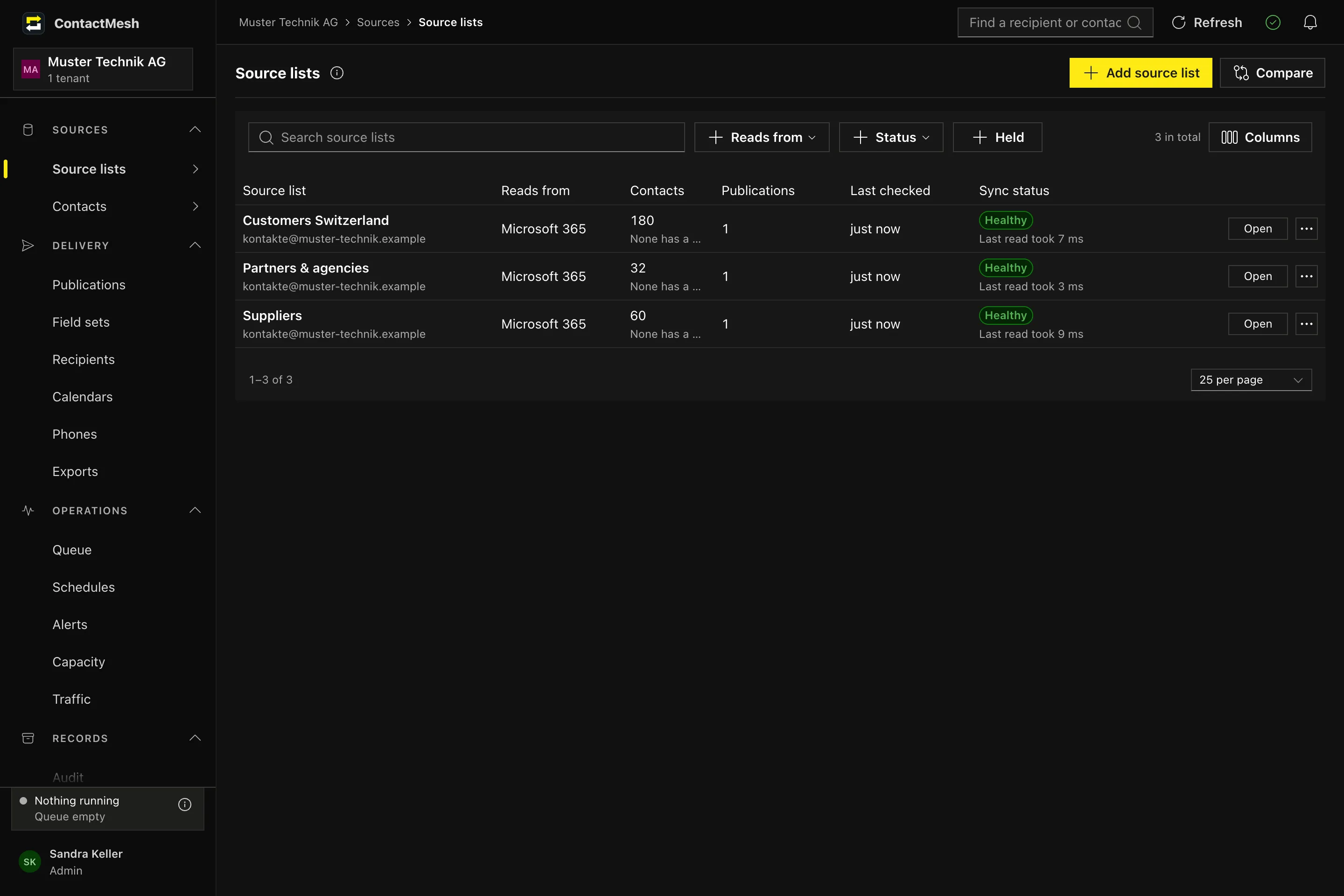
A source list is the set of contacts ContactMesh reads and publishes. It can come from seven places, chosen when the source is created and fixed afterwards: a contact folder in a shared mailbox, a CSV or an Excel workbook on a mounted folder, a view or table in a database — SQL Server, PostgreSQL, MySQL / MariaDB or Oracle — the directory of the source’s own tenant — its people, the address list — an Active Directory or other LDAP directory on your own network (AD / LDAP), a SharePoint list on a site of the source’s tenant, or your own job, which pushes its people to a push API.
A source belongs to one tenant for good: it is the tenant selected at the top, and under All tenants the dialog asks for one of the tenants that are switched on before it loads folders or saves.
For the mailbox kind, adding one asks for the mailbox and the folder. Both are resolved against the directory rather than typed as free text, so a source cannot be created against a mailbox the registration cannot reach — the failure happens now, with a message, rather than at the first sync. The file and database kinds ask for a file name inside the mounted source folder, or for the server and the object, and both additionally ask which columns identify a row as the same person as last time. A file offers the columns of its own header, or Outlook’s names while it cannot be read yet.
Both also ask for Fewest rows: the fewest rows the file or the object ever legitimately holds. A read below it removes nobody. A file may leave it at 0, which does not check: a file cut off in the middle of a row shows that it was cut, but one cut exactly at a row boundary reads as a complete, smaller file, and only this floor tells the two apart. A database source has to set it, because a query has no end to cut — a view whose filter changed, a login whose SELECT was narrowed and an address book that really shrank all answer cleanly and short.
A database connection is always encrypted, and the server’s certificate is checked; what each engine needs for that is under SQL Server, PostgreSQL, MySQL and Oracle.
The kind is fixed once the source exists, because a source’s contacts are keyed by the reader that produced them — changing it would remove every contact and create it again as a stranger in every recipient’s mailbox.
What it holds
Section titled “What it holds”Once created, the source is read on a schedule and cached: every contact, its fields, and a hash of what it looked like. That cache is what makes the rest of the product possible — a publication can be previewed without touching Graph, a field set can be changed and its effect computed, and a reconciliation can compare a mailbox against what the source said without reading the source again.
A mailbox source reads each contact’s picture too, whatever its publications deliver, so the Contacts page can show it: one Graph request per contact the first time, at most 200 a round, and after that one only when a contact changes.
The source is never written to. A contact edited in a recipient’s own copy is corrected back to what the source holds; it does not travel upward.
A contact
Section titled “A contact”Open on a row of a source’s Contacts tab opens the contact in a pane beside the table: its name, its job title and company, its revision and when it last changed, and its picture twice — At the source, as the source holds it, and Delivered, as a recipient is given it — or its initials. Its fields stand in four boxes — Contact for its addresses and numbers, Work, Address and More for the rest — each by its name in the field catalogue. A field with nothing in it is left out, and so is a box. Under them it says where the contact goes — the publications, the recipients’ folders that still receive it and the approved phones — and whether it has a picture. Delivery opens the contact’s own page; Download vCard saves its card.
A contact’s history
Section titled “A contact’s history”An opened contact’s History stands under its fields, and the contact’s own page, reached from the search, shows its Change history too — which is where a contact the source has removed is still found. Each round that changes a contact is a revision of it — First seen, Changed or Removed from the source — and the fifty most recent are shown.
The revisions stand in a list beside the changes, newest first, with when each was recorded and how many fields it changed; in the contact’s pane, which is narrow, they are a picker above them. The revision open is shown as a diff against the one before it:
- a line taken out stands on red behind a −, a line put in on green behind a +, and the lines both share stand between them, so one telephone number changed among three reads as one line out and one in;
- where one line replaced another, the words that changed are marked, as AG in Analytical Engines AG;
- an e-mail entry reads by its address, and by its label too where only the label changed;
- the picture is kept as a fingerprint, so its change reads as words: added, removed or changed.
Compare with picks an older revision instead: the comparison is composed from the changes recorded between the two, and lists only the fields that read differently at each end. Field follows one field: the list narrows to the revisions that touched it, each with what the field read after it. Unified puts the lines in one column and Side by side each beside its replacement, a choice the browser keeps for every history and for comparing two source lists. Newer and Older, and the arrow keys in the list, step through it.
An empty history says which of two things is true: nothing has changed since recording began, or nothing has been recorded yet. A contact that existed before recording began has a revision number and no history behind it.
Your own column names
Section titled “Your own column names”A file source and a database source both start on the columns they expect — Outlook’s own for a CSV, a
fixed set of eighteen for a view — and neither has to stay there. For a database, those eighteen are
fixed names: FirstName, LastName, Company and the rest. A view on your server that renames your
own columns to them is the better answer than a table: it is where your own filtering lives, it decides
what ContactMesh sees, and the login then needs SELECT on that one object and nothing else. Edit
columns, on the source’s Columns tab, reads the real header and lists every contact field beside a dropdown of your
actual columns. What you map is read; what you leave unmapped is never written. The screen colours each
field by classification, so you can see that you have just mapped a private mobile number into a
publication, and it names the fields that cannot be mapped from a source of this kind, with the
reason. Which column can fill which field, and where each field can arrive, is in
Fields by source and destination.
Two rules sit beside each mapped column. A date layout, because 31.12.2026 and 12/31/2026 are
the same day only if something says which one you wrote; and a list separator, for a cell holding
several addresses. Get either wrong and the cell reads as nothing — which is not silent: the source
page counts those cells and names their fields.
A picture column is chosen on the same screen and is not a contact field. Say which column holds
the picture and which of three forms it is in: base64 text in the cell, bytes in the database for a
binary column — varbinary, bytea, blob or longblob, or Oracle’s BLOB — or a file on this source’s own folder — where the cell holds a name inside the
mounted root and nothing outside it is ever opened. A picture that fails to read leaves the stored one
alone and is reported on the source page with its reason. A file too large, or not a picture, is not opened
again until it changes — its size or the time it was written — and the page goes on counting it.
A CSV file
Section titled “A CSV file”The header row decides the separator: commas, semicolons or tabs, whichever it holds most. The text is UTF-8, or Windows-1252 as Excel’s plain CSV and Outlook’s export save it on Windows, so a file saved by Excel in Switzerland, Germany or Austria reads as it is. A file in any other encoding is refused, and removes nobody.
An Excel workbook
Section titled “An Excel workbook”A file whose name ends in .xlsx is read as a workbook, and otherwise like a CSV: the header row and
the rows under it, with the same identity columns, column map, limits and refusals.
- Which sheet. The first visible one, or the one chosen under Sheet, which is offered when the workbook has more than one. Hidden sheets are neither offered nor read.
- How a cell reads. As Excel shows it: a number in full (
41791234567, never4.18E+10), a formula as its last calculated value. A date reads as ISO,2026-10-08, and an error such as#N/Aas empty. - What is skipped. Empty rows, and empty columns right of the header. Hidden rows and columns are read, and a refusal names a row by the number in Excel’s margin.
SQL Server, PostgreSQL, MySQL and Oracle
Section titled “SQL Server, PostgreSQL, MySQL and Oracle”A Database source reads a view or a table on one of four engines, chosen under Engine: SQL Server (Azure SQL too), PostgreSQL, MySQL / MariaDB and Oracle. The engine sets the port the source opens on — 1433, 5432, 3306 or 1521, until you type another — and what two of the fields mean:
| Engine | Database | Schema |
|---|---|---|
| SQL Server | the database; a Named instance replaces the port | usually dbo |
| PostgreSQL | the database | usually public |
| MySQL / MariaDB | the database, which is the schema there | — |
| Oracle | Service: the service name, as in host:port/service, not the SID | the owner of the view |
The engine is fixed once the source holds contacts, like the database, the schema and the view: another engine under the same names is another set of data.
Names. Without a column map, ContactMesh reads the eighteen columns of the view by name —
FirstName, LastName and the rest. PostgreSQL stores a name written without quotes in lower case and
Oracle in upper case, so a view written SELECT Vorname AS FirstName has a column firstname or
FIRSTNAME, and is read all the same; a name written in quotes is found as it is written. The same goes
for the schema and the view typed in the editor. SQL Server and MySQL compare column names without regard
to case.
Encryption. Every engine is encrypted before the password is sent, and there is no setting that turns that off. The server’s certificate is checked against the system’s own CAs and the CA certificate stored with the source — an internal CA in PEM, or the server’s own self-signed certificate; never a key — and its name against the server the source reaches it by. A CA never makes a wrong name right: connect by the name on the certificate.
- Trust server certificate keeps the encryption and skips the check, on SQL Server, PostgreSQL and MySQL. It is meant for a server whose certificate cannot be checked at all, such as MySQL’s own generated one, which names no server; a CA certificate is the better answer wherever there is one.
- On SQL Server there is no CA field: its driver takes none. Connecting by an address that is not the name on the certificate is answered with Certificate name, which keeps the check.
- On Oracle there is no trust switch: its driver always checks. A self-signed certificate is pasted as the CA certificate.
What the server needs.
- SQL Server: TLS, which every supported SQL Server offers; with a certificate the system trusts, or Trust server certificate for a self-signed one.
- PostgreSQL:
ssl = onwith a certificate whose name is the server’s, and apg_hba.confline,hostorhostssl, that lets the login in with a password (scram-sha-256). Name the primary, not a standby: a standby that lags answers short. - MySQL / MariaDB: TLS with a certificate whose name is the server’s (
ssl_ca,ssl_cert,ssl_key). MySQL 8 and MariaDB 11.4 switch TLS on by themselves, with a generated certificate that names no server: replace it, or use Trust server certificate. - Oracle: a TCPS endpoint on the listener —
(PROTOCOL = TCPS)inlistener.ora, often on port 2484, with a server wallet made withorapki— and the service registered with it; the source’s port is that TCPS port. Oracle’s native network encryption alone does not do: it encrypts without proving which server answered, so the password could go to anybody in between. ContactMesh needs no wallet of its own.
The login needs SELECT on the one view or table and nothing else: GRANT SELECT ON … TO …, and on
Oracle CREATE SESSION as well. MySQL answers a login with no grant alike whether the view is there or
not, so there a view that is missing reads as not permitted; Oracle does the same the other way round,
and a view the login may not read reads as not found.
Refusals. A server that offers no TLS, or not on that port, is SourceQueryTlsFailed; a certificate
nothing trusts is SourceQueryCertificateUntrusted, one that names another server
SourceQueryCertificateNameMismatch. A PostgreSQL standby, a server that answers pg_is_in_recovery() with
true, is SourceQueryStandby: what it answers is only as recent as its replication, and nothing a login may
ask says how recent, so a source reads the primary. The error a refusal carries is the engine’s own code: SQL Server’s
error number, PostgreSQL’s SQLSTATE such as 28P01, MySQL’s error number such as 1045, Oracle’s such as
ORA-01017. Never the server’s message, which names the database, the view and the login.
A database source is a connector, so it needs Connectors in the licence, on every engine. An isolated demo with no sign-in refuses it.
A directory source
Section titled “A directory source”A directory source publishes the people of its tenant’s own Entra directory, read with that tenant’s app registration. There is no mailbox, file or server to name; what it asks is which people:
- Enabled accounts only and Members only (no guests), both on by default. An account with no user type at all, as older ones have, counts as a member.
- Mailboxes only: users with an e-mail address, which is what a mailbox gives them and what puts them in the address list.
- Departments, Office locations and Companies: only people whose value is one of those named, spelled as in the directory; letter case does not matter. An empty list does not filter.
- Organisational contacts: the tenant’s contacts for people outside it, read as well. Off by default,
and reading them needs
OrgContact.Read.All(Microsoft 365 setup). The three account switches are about accounts and leave a contact alone; the three lists apply to it. - Pictures: each user’s profile picture, whatever the publications deliver. The directory does not report a changed picture, so each one is looked at again once a day.
Matches counts the people the filters select while you choose them. The worker counts it, from the directory’s search index, which can lag the directory by a few seconds; the reads themselves do not use that index.
The first read lists everybody the filters select and keeps a delta link, and every read after it asks only what changed. Somebody whose account is disabled, who leaves a department filtered on, or who is deleted is removed from every recipient’s copy on the next read, behind the tenant’s deletion guard like any other removal. Changing the filters reads in full once, so the people a narrower filter leaves out are removed the same way. Which directory property fills which contact field is in Fields by source and destination.
Active Directory and other LDAP directories
Section titled “Active Directory and other LDAP directories”An AD / LDAP source publishes the people of a directory on your own network: an Active Directory domain, or any other LDAP directory such as OpenLDAP. It is read in full on every round, on a schedule of its own every 15 minutes, so a directory that stops answering holds up no other source.
Connection.
- Servers: the directory’s servers by name, tried in order; the next one only when one cannot be reached. A server that answers and refuses the password is the answer for the whole domain.
- Encryption: LDAPS (port 636) or StartTLS (port 389). There is no plain LDAP: the sign-in is a simple bind, which would send the password unencrypted.
- Forest: Global Catalog reads every domain of an Active Directory forest through its Global
Catalog, on port 3269 with LDAPS or 3268 with StartTLS, from base DNs as wide as the forest, such as
DC=corp,DC=example. The Global Catalog holds only part of each person: the attributes the forest’s schema marks for it, which depend on the forest, Exchange’s schema adding most of what an address book shows. The rest are not read, a field filled only from them stays empty on every card, and Matches names them. A group counts all its members only if it is a universal group or of the Global Catalog server’s own domain. - CA certificate: the certificate of an internal CA, such as AD CS, in PEM — one certificate or a chain, never a key. It is trusted beside the system’s own CAs. The server’s certificate must name the server it is reached by, whatever CA issued it.
- Account and Password: a DN,
user@domainorDOMAIN\user, signing in with a simple bind. The password is stored encrypted, in a field of its own, and never shown again. Kerberos and Negotiate sign-ins are not supported.
The account needs read access to the people under the base DNs; on Active Directory an ordinary domain user has it. People are read in pages of 500, so the directory’s own size limit must let the account page through all of them.
Which directory. Whether it is Active Directory, AD LDS or another LDAP directory is read from the
directory itself on every round, not set. It decides how a person is identified: by objectGUID on Active
Directory and AD LDS and by entryUUID elsewhere, so somebody moved to another OU or renamed keeps their
card. A directory that has neither is refused. AD LDS is read as Active Directory is, with the same
attribute names, wherever its schema has them.
Which people.
- Base DNs: where people are read from, each with everything below it. References to other partitions and domains are not followed, so one source reads one domain; a forest’s other domains need a source each, or the Global Catalog.
- Enabled accounts only, on by default, on Active Directory and AD LDS:
userAccountControlsays whether an account is disabled, on AD LDSmsDS-UserAccountDisabled. Another directory has no standard attribute for it, so there the switch filters nothing. - With e-mail only, on by default: an on-premises domain holds service and built-in accounts that belong in no address book.
- Contact objects too: Active Directory’s and AD LDS’s contact objects, as well as their users. Off by default.
- Group: only members of this group, by its DN. On Active Directory and AD LDS members of nested groups
count too (
LDAP_MATCHING_RULE_IN_CHAIN). Elsewhere it is asked throughmemberOf, which OpenLDAP keeps only with its memberof overlay, and it is not nested. - Departments, Office locations and Companies: as for a directory source, matched exactly, whatever the letter case. An empty list does not filter.
- Filter: an LDAP filter of your own, in parentheses, combined with the rest, such as
(title=*). It is checked when you save. - Fewest people: required. A read that finds fewer removes nobody: an emptied OU, a group whose members were replaced and an account whose read access was narrowed all answer cleanly and short.
- Pictures: each person’s
thumbnailPhoto, orjpegPhoto. Off by default. The first round reads every picture; after it, a picture is read again only when the person’s entry has changed since:whenChangedanduSNChangedon Active Directory,entryCSNormodifyTimestampelsewhere. A picture too large, or not a picture, waits for the same: it is counted on the source page and not read again until the entry changes. A directory that keeps none of them has every picture read on every round.
Matches reads the directory with the settings in the editor and shows how many people they select, with a few of them. It signs in with the saved connection and the stored password, so a source has to be saved with its password first, and a changed server, port, encryption, CA or account has to be saved before it is previewed. Nothing is changed. It counts up to 10’000 and reads more than 10’000 past that, reads no pictures, and answers that the directory did not answer in time after 30 seconds.
Somebody who leaves the scope — disabled, moved out of a base DN or a group, or deleted — is removed from every recipient’s copy on the next round, behind the tenant’s deletion guard. A source pointed at another directory, where every person read is a stranger, is refused rather than rebuilt. Which attribute fills which contact field is in Fields by source and destination.
An AD / LDAP source is a connector, so it needs Connectors in the licence. An isolated demo with no sign-in refuses it, as it refuses a file or a database.
A SharePoint list
Section titled “A SharePoint list”A SharePoint list source publishes the items of one list on a SharePoint site of its tenant: the list a team keeps its suppliers, its partners or its phone list in. It is read through Microsoft Graph with the tenant’s own app registration, on a schedule of its own every 5 minutes, so a site that is holding this deployment off holds up no other source. Nothing is installed next to it, hosted or not.
The grant. ContactMesh asks for Sites.Selected and nothing broader: it reads no site at all until an
administrator grants it read on that one site. Add Sites.Selected to the app registration’s application
permissions and consent to it (Microsoft 365 setup), then grant read on the
site, as a SharePoint Administrator who is a member of the site, with Microsoft Graph PowerShell:
Connect-MgGraph -Scopes 'Sites.FullControl.All'New-MgSitePermission -SiteId '<site id>' -BodyParameter @{ roles = @('read') grantedToIdentities = @(@{ application = @{ id = '<application (client) id>'; displayName = 'ContactMesh' } })}Sites.FullControl.All is the administrator’s, for the grant, and never the application’s. The tenant’s
Setup tab and its setup check fill in the site’s id and the application’s client id once the source exists;
the check reads the list as the round reads it and, when Graph refuses, gives this command on the source’s
row. Sites.Read.All would work too and reads every site in the tenant, so the check reports it as more than
is needed. Microsoft’s newer Lists.SelectedOperations.Selected, a grant on one list, breaks that list’s
permission inheritance, which a team’s own list should not have done to it, so ContactMesh asks for the site.
Choosing the list.
- Site: the address of the site, or of any page on it — the list’s own view included. Find looks it up and names it.
- List: one of the site’s lists. Document libraries are not offered.
- Identified by: The item, by default, or one of the list’s columns. SharePoint gives every item an id that no edit changes and no other item is ever given, so with it a corrected address or a new surname is an edit, and a deleted item is reported by the list itself. Choose a column, such as the e-mail address, only for a list that is emptied and filled again from an import: every item is new each time, and the address is what stays the same. A changed address is then a removal and an arrival, and an item without one, or two with the same, refuse the round.
- Fewest items: required. A read that would leave fewer items removes nobody — a list somebody emptied, item by item or at once, and one a permission change makes read as empty answer cleanly and short.
The site, the list and the identity are fixed once the source holds contacts.
Columns. A list made from SharePoint’s own Contacts app is read by its columns before anybody maps it;
on another list its Title is the contact’s name, and a column named as the Contacts app names its own fills
the same field. The first read saves that as the source’s map, and
Edit columns changes it, with the columns by their headings and a few values of
each. A person or lookup column reads as the name the list shows, a choice as its value, several as Outlook’s
;-separated list, multiple lines of text as text without its formatting, and a date without a time as that
day. A column the map reads that is deleted from the list refuses the round by name.
Pictures come from an image column, chosen as the picture column; a list without one has none. A picture is read when its item arrives or changes, at most 200 a round. SharePoint keeps some pictures as attachments of the item, which Microsoft Graph cannot hand over: they are counted on the source page and never taken for a removed picture.
The first read lists every item and keeps the list’s delta link; every read after it asks only what changed, and a deleted item is removed from every recipient’s copy behind the tenant’s deletion guard. The list is read in full again when Graph no longer honours the link, when the map or the identity changes, after a round left pictures for the next, and once a day. With a column as the identity, a change reported by the delta reads the list in full. Where Microsoft 365 gives the site’s grant no delta at all, the list is read in full every round instead: slower for a long list, but nothing is missed.
A SharePoint source is a connector, so it needs Connectors in the licence. An isolated demo reads it from its built-in site, as it reads the directory.
A push API
Section titled “A push API”A Push API source is a list nothing reads: your own job pushes its people into it over HTTPS — an ERP export, an HR system, a script on a server. It needs no database access and no file share, only the source’s key. A whole list is pushed as JSON, CSV or an Excel workbook; a job that only knows what changed pushes its changes instead.
Switching it on. The push API is off until the installation turns it on: set PUSH_API_ENABLED=true in
.env and restart the API. Off, every address under /push answers 404, the source editor shows the kind
Switched off, and a push source’s keys can be revoked but not made or rotated. A push source made while
it was on stays listed.
Creating one.
- Identified by: the column or columns your job sends that make a row the same person as last time — its own id, a personnel number, or the e-mail address. Required before the first push, and fixed once the source holds contacts, as a file’s identity is. A row without it, or two rows with the same, refuse a whole list.
- Fewest rows: the fewest people the list ever legitimately holds, or 0. A whole list pushed below it, or a change that would leave fewer, removes nobody.
Then save, and Create key on the source’s Connection tab. The key is shown once: copy it into your job’s
configuration then. It starts with cmsk_, so a secret scanner recognises one pasted where it should not be.
ContactMesh keeps only a keyed hash of it, and nothing logs it.
- Rotate makes a new key and keeps the old one working for a day, so the job can be switched over without a refused push. A lost key is rotated, never recovered.
- Revoke ends every key of the source at once, the one still rotating out included.
A key reaches its own source list and nothing else. Making, rotating and revoking one are an Admin’s, with a
recent proof of who is asking, and each is in the audit log; a list editor reads the
list’s pushes and its keys’ dates and asks the Admin for a key. The Connection tab, and the editor, show the address,
the keys, the last pushes and a curl example to copy.
Pushing. The address is /push/v1/source-lists/<id> under the address your job reaches ContactMesh at,
and every request carries Authorization: Bearer <key>.
PUTsends the whole list: a JSON array of rows,text/csvwith a header row (read as a CSV file is), or an Excel workbook (application/vnd.openxmlformats-officedocument.spreadsheetml.sheet, its first visible sheet). Whoever is not in it is removed, behind the floor and the tenant’s deletion guard: a removal the guard holds waits for an Admin’s approval on the source page, and the next push of the same list carries it out.POSTsends changes:{"upsert": [rows…], "delete": [ids…]}. A row inupsertcreates or replaces that person; an entry indeletenames one by the identity’s columns, as an object, or by its value alone where one column is the identity. Nobody else is touched.
A row is an object of columns, each a text, a number, true, false or null. Until the source’s
column map names your own columns, a column is one of the product’s field names —
givenName, surname, companyName, emailAddresses[0].address, businessPhones[0],
businessAddress.city, the rest are in Fields by source and destination
— or one of the identity’s columns, and photo carries a picture in base64. A column that is neither refuses
the push by its name, so a misspelt field never empties a card. A column a row leaves out is empty: a row
replaces its person whole. With a map, the map’s columns are read and any other is passed over, as a file’s
are; Edit columns offers the columns of the last push.
[ { "employeeId": "4711", "givenName": "Anna", "surname": "Muster", "emailAddresses[0].address": "anna.muster@example.com", "businessPhones[0]": "+41 44 123 45 67" }, { "employeeId": "4712", "givenName": "Beat", "surname": "Beispiel", "companyName": "Example AG" }]The answer comes at once, because the push is committed inside the request; writing to the mailboxes then
happens as for every source, in the worker, behind the publication’s sign-off. It says what was taken, in counts
— received, created, updated, unchanged, removed, held, rejected and keptOut — and its
outcome: Accepted, Held when the deletion guard holds removals, or Refused with a code and what it is
about. A refusal takes nothing and removes nobody, and the source’s row says why, as for a file. In a push of
changes an entry that cannot be read is listed by its number and reason, and the rest are taken. Somebody
erased and pushed again is kept out, and counted.
Retries. Send an Idempotency-Key header, new for each push. The same push sent again with it within a
day is answered as the first was, with Idempotent-Replayed: true, and changes nothing; the same key with
another body is refused. A push that was refused is not kept under its key, so it is read afresh once the
export is fixed.
Limits. A push carries at most 8 MB and 50,000 rows (Push__MaximumMegabytes, Push__MaximumRows), and a
source takes 12 pushes a minute (Push__PushesPerMinute); a push past a limit is refused whole with the limit,
never cut. A rotated key works for 24 hours (Push__RotationGraceHours).
Where it is reached. The push API is meant to be reached from inside your network, by your own job, at the
same address as the dashboard. It takes HTTPS, through the reverse proxy in front of ContactMesh, and plain
HTTP only from the host itself, for a job on the same server. A job that runs elsewhere — another site, a
cloud service — reaches it only through a reverse proxy you publish for /push/ alone, so the dashboard stays
inside. With nginx:
server { listen 443 ssl; server_name push.example.com; # ssl_certificate and ssl_certificate_key as for the dashboard client_max_body_size 9m; location /push/ { proxy_pass http://127.0.0.1:5080; proxy_set_header Host $host; proxy_set_header X-Forwarded-For $remote_addr; proxy_set_header X-Forwarded-Proto https; } location = /openapi/push.json { proxy_pass http://127.0.0.1:5080; } location / { return 404; }}Allow only the job’s own addresses there where you can. ContactMesh has to trust the proxy’s forwarded headers, as it does the dashboard’s proxy (Ports and exposure).
The API document is at /openapi/push.json, readable without signing in: both routes, every answer and an
example of each. A job in PowerShell:
$key = $env:CONTACTMESH_PUSH_KEYInvoke-RestMethod -Method Put -Uri 'https://contactmesh.example.com/push/v1/source-lists/<id>' ` -Headers @{ Authorization = "Bearer $key"; 'Idempotency-Key' = (Get-Date -Format 'yyyy-MM-dd') } ` -ContentType 'text/csv; charset=utf-8' -InFile '.\export.csv'A push source is a connector, so it needs Connectors in the licence. Read changes and Safe full re-read are not offered: nothing reads it, and its next push is what changes it.
Re-sending everything
Section titled “Re-sending everything”Full sync, behind ”…” on a source’s page, delivers what the source already holds to every recipient of every publication it feeds, whether or not anything changed. It exists for one thing: an e-mail display name corrected at source before ContactMesh could notice. That field is excluded from the comparison that decides whether a contact has drifted, because Exchange rewrites it for any address it can resolve and including it once put live contacts in a permanent loop — so nothing can work out which cards hold a stale one, and nothing needs to, because re-writing is harmless. It is refused while a rollout is still releasing waves, and it names the publication to wait for.
Deltas and full reads
Section titled “Deltas and full reads”For a mailbox, directory or SharePoint source, ordinarily only what changed is read, using Graph’s delta link. A full read happens when there is no usable checkpoint — the first sync, after a restore, or when Graph invalidates the link, which it does after long enough — for a directory source when its filters change, and for a SharePoint source when its columns’ map changes and once a day.
Read changes asks the worker’s round for this kind of source to read this source alone: the page reads Waiting for the worker…, then Checking…, until it has read and says what changed.
Safe full re-read, behind the same ”…”, gives up the checkpoint and books the full read for the worker’s next round for this kind of source; the source’s row shows the read once it lands. Approving a held deletion set works the same way: the approval stands for fifteen minutes and the worker’s next read carries it out, so it is refused while no worker is running.
How the last read went
Section titled “How the last read went”On the Source lists screen, under each source’s status, is what its last read could not do and how long it took. A read that failed keeps the checkpoint it had, and with it the status it had, so a source can read Healthy over a round that could not read it: the sentence under the badge says why, with the code behind its “i”. A deletion set held for approval is not a failure and is counted in Held instead.
Last read took is how long the last read lasted, from the moment its round had the source to the moment it recorded what it found: a change, nothing new, a refusal or a failure. It is the round’s time on this source alone; the round’s own duration on Operations is every source of its kind together. A file, a database or an LDAP directory that has not changed is still read, so its last read can be newer than Last checked, which only moves when something is taken in. Read changes is answered by the same round and timed the same way. Each read replaces the last one’s start, end and duration, so only the last read is kept, for as long as the source exists; the source’s Reading tab says it beside Last checked. A source not read since this was recorded has no figure.
When a read is refused
Section titled “When a read is refused”A file, database, directory, AD / LDAP or SharePoint source refuses a round it cannot trust rather than act on it.
The list read last time stands, nobody is added or removed, and the source’s page says why in one
sentence with the code beside it — SourceFile…, SourceQuery…, SourceDirectory…, SourceLdap… or
SourceSharePoint…, the half to search for. A SharePoint source refuses when Graph will not read its site
(SourceSharePointNotPermitted: Sites.Selected or the grant on the site missing), when the site or the list
is gone, when a column it reads is gone, and when the list would hold fewer items than Fewest items. A directory source refuses when Graph will not list the users or the
organisational contacts (SourceDirectoryNotPermitted, SourceDirectoryContactsNotPermitted: a grant
missing or never consented to) and while the tenant’s directory is holding this deployment off
(SourceDirectoryThrottled); the next round asks again. An AD / LDAP source refuses when no server can
be reached, when the connection is not encrypted or its certificate is not trusted or does not name the
server (SourceLdapCertificateUntrusted, SourceLdapCertificateNameMismatch), when the account is
refused, when a base DN is not in the directory — named by its position — and when it finds fewer people
than Fewest people. Most say what to fix. Three need more than the sentence has room for:
- The file changed while it was read (
SourceFileChangedDuringRead). What was read would be part of one file and part of another, so nothing of it is used. The next round reads the file again. - Every row is identified differently (
SourceIdentityRekeyed,SourceQueryRekeyed,SourceLdapRekeyed,SourceSharePointRekeyed). Every stored contact would be removed and every row created again as a stranger in every mailbox. That is a rebuild rather than a change, so nothing is done. The columns that identify a contact are fixed for the same reason once the source holds contacts: to identify them by something else, create a new source. - The database or directory password cannot be decrypted (
SourceQueryCredentialUnreadable,SourceLdapCredentialUnreadable). It is held encrypted with the deployment’s protection key. It cannot be read once the key has changed, or when the database came from a backup taken under another key: restore that key, or enter the password again.
Anomalies in this source
Section titled “Anomalies in this source”A source’s Anomalies tab lists what the checks ContactMesh makes on every source found. A finding is advisory and holds nothing back. Two need more than the line the table has room for:
- A numbered slot with nothing in it. Outlook keeps a numbered slot — Email 2, a second business phone — when somebody clears the address or number in it, so the card looks as though it has one and does not: in Outlook, in every export, and in the recipient’s mailbox as well, because the slot is delivered exactly where the source keeps it. The value in the slot below is not moved up to fill the gap (see Numbered entries). A card with only Business phone 2 or Home phone 2 filled, a speed dial for instance, is the same, in a mailbox and in a file or database row alike: its number arrives as Business phone 2 or Home phone 2. Fill the slot at the source, or clear the card properly.
- No email address, matched by telephone. The contact is delivered, but it is identified by its telephone number rather than an address, which is a weaker identity. A card already in a folder is therefore claimed only when the number is unique on both sides and the name agrees. Adding an address makes the match certain.
Rules of your own
Section titled “Rules of your own”A source’s Rules tab holds Source rules. The anomalies table holds the checks ContactMesh makes everywhere; this is where you add the ones that are true of your directory — every address on one of our domains, every business number with its country code — which nothing general could know.
A rule flags and never gates. A contact that breaks one is delivered, unchanged, to every recipient, at the same moment and with the same fields as if the rule did not exist. Nothing is held back, delayed or removed, and no rule can be made to do any of those. The findings appear in the anomalies table under your own wording, badged Changes nothing about sync.
Add rule opens one dialog: a name in your own words, a field — with its position, so Email 2 is a different thing from Email — a check, its settings, and optionally a condition. Check now says how many contacts the rule would flag before it is saved, with a few names, so a rule that would flag the whole directory is visible while it can still be changed.
The checks
Section titled “The checks”| Check | What it looks for |
|---|---|
| Email domain | An address whose domain is, or is not, in a list you give. |
| Phone format | A number without its country code, with the wrong one, or not matching a pattern. |
| Filled or empty | A blank where the directory needs a value; a value where it must not carry one. |
| Allowed values | A value outside a closed set, or inside a junk set such as n/a, -, tbd. |
| Text hygiene | Stray and non-breaking spaces, control characters, and the ü sequences a CSV import through the wrong code page leaves behind. Line breaks are not damage, so this is safe to point at the notes box or a postal address. |
| Pattern | Your own regular expression — a postcode shape, an internal customer number. |
| Unique value | Every contact in a group of more than one sharing an address, a number or a name. |
Two worked examples, which are the ones this started from:
- Every address is one of ours. Email domain, on
Email addresses · Every position, mode Only these, domains
ete.ch, ete.email. - Business numbers carry the country code. Phone format, on
Business phones · Every position, mode International, country codes
+41.
Missing a name, an email address or a phone number
Section titled “Missing a name, an email address or a phone number”Three checks are built in and switched on per source in the same table, each with its own switch: No name (no display name, first name or surname), No email address (none in any position) and No phone number (no business, home or mobile number). They are off on every source until you switch one on, because what an entry may lack depends on the list: a phone book has entries without an address, an email list entries without a number.
A check that is on reports one finding in the anomalies table, badged Changes nothing about sync: the entries are delivered as they are, and nothing is held back. The finding counts every entry; Show contacts names a few, and Show all opens the Contacts tab on all of them, a page at a time. Switching a check needs an administrator.
Two things worth knowing before you write one
Section titled “Two things worth knowing before you write one”A blank is never a violation — except under Filled or empty in mode Filled, which is the check that is about the blank itself. Half of any shared address book has no second address and no department, so a domain rule that fired on an empty slot would flag the whole directory the moment it was saved.
A number is judged on its form, not its text. +41 61 555 01 99, 0041615550199 and
061 555 01 99 are one number; a rule about country codes recognises all three for what they are, and
a duplicate rule groups them together.
The Only when row limits a rule to the contacts a condition matches. Note that is not and does not contain also match a contact that does not carry the property at all — for “only contacts that have one”, use has any value.
At most 25 rules can be switched on for one source. Switching a rule off keeps it and stops it being checked. Rules are per source folder and are visible to anybody who can see the source; changing them needs an administrator.
Comparing two source lists
Section titled “Comparing two source lists”Compare, under Source lists in the navigation and at the head of that page, or Compare with in a list’s pane or behind … on its page, opens two lists side by side — before merging them, or before one replaces the other. Choose List A and List B; they may belong to different tenants. The page’s address names both, so a comparison can be sent as a link.
The comparison reads what ContactMesh already holds of each list. Nothing is read from a mailbox, a file or a database, so it is as current as each list’s last read.
Who is one person. Two contacts are the same person when they share an email address, and failing
that a phone number. Addresses are compared trimmed and without case. Numbers are compared by their
last nine digits, as adoption matches them, so +41 61 555 01 99,
0041 61 555 01 99 and 061 555 01 99 are one number. A number of fewer than seven digits, such as an
internal extension, matches nobody.
An address or number only counts when exactly one contact in each list holds it. The front desk’s
info@ on several cards matches nobody, but those people are still matched by their own addresses.
The result is six tabs, each with its count:
| Tab | Who is in it |
|---|---|
| Only in A | Nobody in B shares an address or a number with them. |
| Only in B | The same, the other way round. |
| Different | In both lists, and in at least one place both cards hold a value and the values differ: Email 2 is another address, the city is spelt otherwise. These are the errors to look at. Fields names each place with the kind of difference. |
| Incomplete | In both lists, nothing differs, but one card holds something the other has nothing in: a department, an Email 2, a picture. More in says which list holds more, or Both where each adds something, and Fields names what. |
| Same | In both lists, and every place holds the same. |
| Ambiguous | They share an address or number with the other list, but it does not lead to exactly one person. For example, two cards in A and one in B with the same address, or one card whose two addresses belong to two different people in B. |
Where a value is. Cards are compared place by place, the way Outlook shows them: a field by its name, an address by its street, city, state, postal code and country, and the numbered fields position by position — Email 1 to 3, Business phone 1 and 2, Home phone 1 and 2, IM address 1 to 3. So Email 2 is compared with Email 2 only. An empty value is no value: one card’s department against the other’s empty department is Incomplete, not Different.
The kind of difference stands beside each place in Different, in the words the folder comparison
uses: letter case, number formatting, other whitespace, shortened, entries reordered, other
change and the rest. A difference that is only formatting reads as such, so a typo stands apart:
+41 44 555 01 01 against 044 555 01 01 is number formatting, against +41 44 555 01 07 it is
other change.
Each table can be searched by name, email address or phone number, and Matched by says whether a pair was found by its address or its number, and shows it as each card writes it.
Open on a row shows the pair in a pane beside the table, as a contact’s history shows a change, A as the old side and B as the new. At the top the conflicts are counted and named, then what each list holds alone, and each name jumps to its place. Each place is drawn as a change: A’s value on red behind a −, B’s on green behind a +, and the words that changed marked; beside its name stands the kind of difference, or Only in and the list that holds it. The categories and the children are read as sets and shown whole, with the entries both hold between, and Ignore case holds here too. Unified and Side by side are the history’s choice, and the browser keeps it for both. The fields that agree are folded underneath while Only differences is on, as it is at first, and listed with the rest when it is off. Under the pair, each card’s name opens its own page, and History holds each card’s history in the list that holds it.
A row with one contact — only in one list, or ambiguous — opens that contact as Contacts does, with the list it is in and, for an ambiguous one, what it shares with the other list at its foot.
What is compared. Every contact field ContactMesh carries, except the three views of the email addresses, which would count one address three times. An email address is compared without the name Outlook shows beside it. The categories and the children have no numbers and are compared as sets: one card holding every entry of the other’s and more is Incomplete, two each holding an entry the other has not are Different. The picture is compared by its content, and only once both contacts have been checked for one; the page says only that it differs.
Ignore case is on by default: text is compared without upper and lower case and with extra spaces ignored, and addresses and phone numbers as they are matched. Off, values must be written exactly the same.
Ignore order is off by default, and the same address in another position is a difference: A’s Email 1 as B’s Email 2 is Different, of the kind entries reordered. On, an address or number the other card holds in any position counts as held, and only what one card holds nowhere on the other is left: the two addresses swapped are Same, and a third address only A holds makes the pair Incomplete. Ignore order never makes a pair more different. Both switches are kept in the page’s address.
Export downloads the open tab as a CSV file, with the search applied. For Different and
Incomplete, each place is its own line, with what it is (Conflict, OnlyA or OnlyB), the kind of
a conflict, and both values. Each download is recorded in the audit log of both lists’ tenants: which tab
and how many rows, not who was in it.
A comparison shows the lists’ contacts, so it needs Read contacts in the tenants of both lists, as the contacts on a source’s own page do; choosing the lists needs Read source lists. Without Read contacts, the navigation has no Compare and a list’s Compare with is shut, saying which role opens it. If you may read the contacts of only one of the two lists, the page says which one you cannot read.
Disabling one
Section titled “Disabling one”The switch on a source list’s page disables it, after a dialog that names the publications reading it and the recipients they reach. A disabled source holds delivery to every one of those publications:
- The folder is no longer read on the schedule.
- Queued work for their recipients waits in the queue instead of being written. Nothing is cancelled. That includes removing contacts: one deleted from the source, or no longer passing a publication’s filters, stays in recipients’ mailboxes until the source list is enabled, as it would through quiet hours.
- The change check and the reconciliation skip their folders, so nothing is listed, created or repaired. Reconcile all on a publication reading it, and approving a folder’s held deletions, are refused for the same reason.
Two things carry on. The membership refresh still runs, because it reads the directory rather than a mailbox and it is how somebody leaving an audience is noticed. And the work that takes data back — removing restricted fields, sanitising the cards of a recipient who lost access, removing an offboarded or reset folder — is still claimed, as it is for a paused folder and in quiet hours. A recipient who loses access has those fields removed whether or not anybody is reading the source; a card they were never given is not created for it.
Every affected folder reads Paused, including once its restricted fields are gone and only held deliveries remain. The source list, each publication reading it and the recipients list say that delivery is held and which source list holds it. Held work does not count towards the oldest-work age on the monitoring endpoints, nor towards the recipients a pacing rate has to reach. Enabling the source list releases the held work where it stopped and puts the folders back into both check rounds.
Removing one
Section titled “Removing one”Delete source appears behind ”…” on the source’s own page once every publication on it is archived, and only to an administrator. While a draft, active or paused publication reads the source there is no Delete to press, and the API refuses with those publications named: archive them, and let their recipients be offboarded, first.
An archived publication is not itself a reason to keep the source. Archiving stops a publication; what still ties it to the estate is whether anything of its is left in somebody’s mailbox or on a phone, and that is the question the delete asks:
| Still true of an archived publication | What happens |
|---|---|
| Recipients still subscribe to it | Refused, with the count. Restore it, remove its audience so they are offboarded under its removal behaviour, then archive it again. |
| Cards in recipient mailboxes are still recorded as written by it | Refused, with the count. Offboarding removes or releases them; deleting the row that explains them would leave cards nothing owns. |
| Device groups still receive it | Refused, with the count. Remove them from its audience, and their phones drop its contacts at their next sync. |
| None of these — it is archived and fully offboarded | It is deleted together with the source, in one transaction. |
So an archived, offboarded publication no longer has to be deleted by hand first. The confirmation names the archived publications that go with the source and says how many cached contacts go with it; the shared mailbox keeps the originals, and a new source pointed at the same folder reads them again. Nothing is changed in any mailbox by the deletion.