Running the service
Settings
The deployment's own settings, a page for each entry under Settings in the navigation — pacing, throughput, the verification round, the queue and retention, sign-in, monitoring and the licence — and what the host decides, shown as facts.
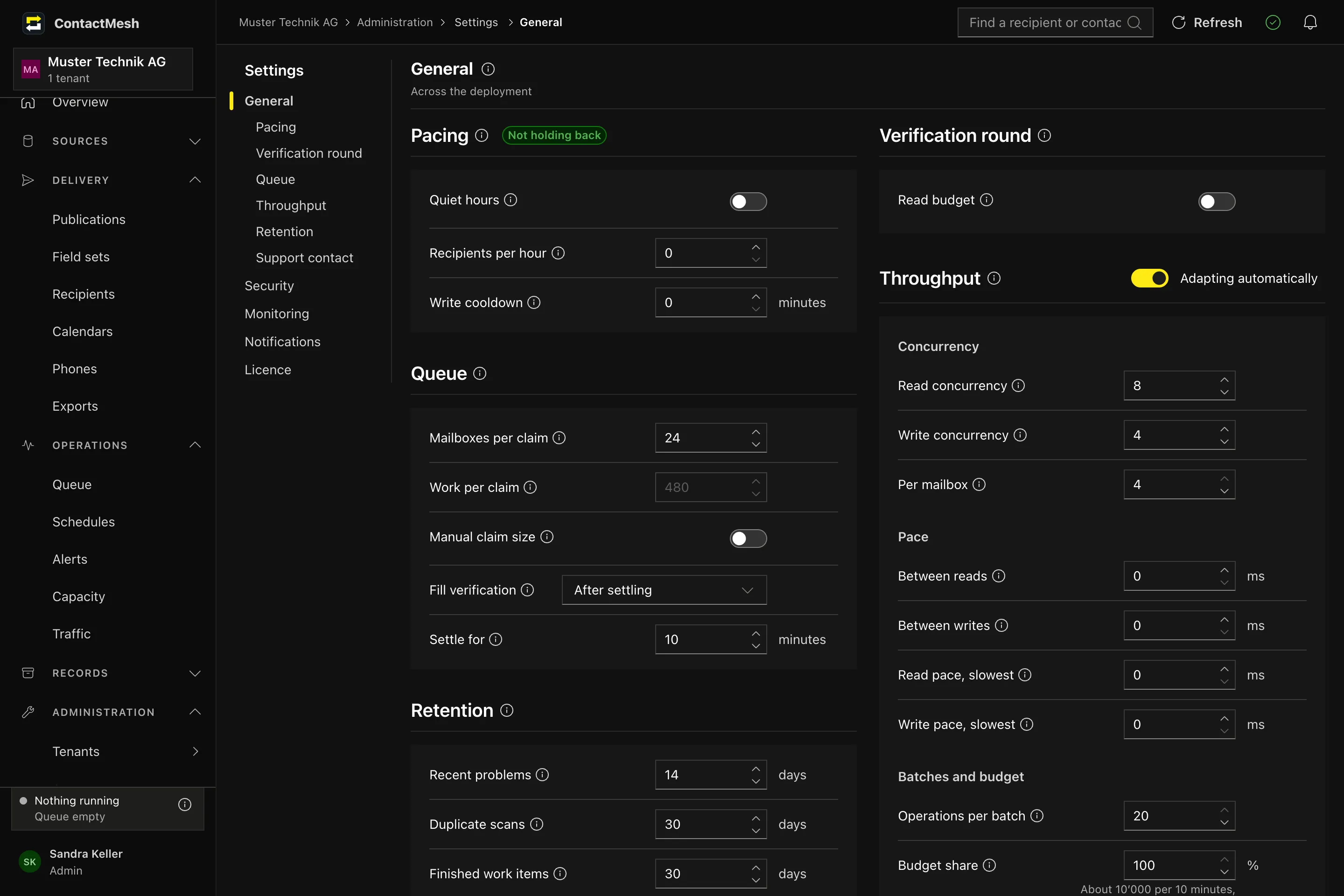
Settings, under Administration in the navigation, holds what the whole deployment is set to, on the pages that open under it: General, Security, Monitoring, Notifications and Licence. Every role can open them; each group is saved by the role its server route asks for, and a group’s Save says so when yours is not enough. Beside each page, Settings’ own column lists the five, General’s groups under it, and marks a group changed and not saved. On General a changed group’s bar, with Save and Discard changes, stands at the foot of the window, and leaving with a change not saved asks first.
A setting that belongs to one thing stays with that thing: a tenant’s on its own page, a source list’s, a publication’s and a field set’s on theirs. Two deployment-wide switches stay beside what they act on, too — a schedule’s frequency and pause on Schedules, next to its runs, and Pause all on Queue, next to the processes it stops. Settings, and where each one lives lists every one of them.
| Page | Group | What it decides | Who may change it |
|---|---|---|---|
| General | Pacing | Quiet hours, recipients per hour, write cooldown | Operator, Admin |
| General | Throughput | Concurrency, pace, operations per batch, the share of Microsoft’s budget, and adaptive mode | Operator, Admin |
| General | Verification round | How much of the estate one round of full checks covers | Operator, Admin |
| General | Queue | How much work a worker claims, and when a filled folder is checked | Operator, Admin |
| General | Retention | How long the deployment keeps its own records | Admin |
| General | Support contact | Who to ask — ContactMesh’s own, unless the host sets its own | Nobody, from here |
| Security | Sign-in | How the dashboard is signed in to — set on the host | Nobody, from here |
| Security | Sign-in policy | Who must use a second factor, the grace, the kinds, how recent a proof a sensitive change needs, how long a browser is remembered, and the idle limit | Admin |
| Security | Protection key | What each key holds — set on the host | Nobody, from here |
| Monitoring | Monitoring | The thresholds the monitoring sensor’s states are judged by | Operator, Admin |
| Licence | Licence | The licence in force: its modules, limits and dates, and installing another | Admin |
Notifications — where what the bell lists is sent, outgoing mail, and the delivery log — is the page under Settings that is an Admin’s alone: nobody else sees its entry.
These used to be the top half of the Capacity screen. Capacity keeps what
is in force and moving now, and links here. An old link to one of its settings cards —
#/capacity?section=retention — opens the group it became. Each page has its address —
#/settings, #/settings/security, #/settings/monitoring, #/settings/notifications and
#/settings/licence — and each group can be linked to by name on its page: #/settings?section=pacing,
throughput, verification, queue, retention or support, and #/settings/security?section=sign-in,
second-factor or protection. A link from when they were all one page, #/settings?section=licence
say, opens the page the group is on now.
Every change takes effect without a restart, and every save is written to the audit trail with what it changed, before and after.
Pacing
Section titled “Pacing”Two brakes and a window. These are about people rather than about Graph: a rollout can sit comfortably inside every Microsoft limit and still put a contact-changed notification in front of four hundred people during a meeting.
The state beside the group’s title is the half that matters, and the Capacity screen shows it too. A deployment deliberately holding work back looks exactly like one failing to keep up, so when either brake holds, the screen names which one, how many items are waiting, and when it lifts.
| Setting | Off when | What waits | What does not |
|---|---|---|---|
| Quiet hours | The switch is off, or the start equals the end | Every queued item below a privacy reduction, for the length of the window. It may wrap midnight | Reads. Source ingestion and the change checks run on the scheduler and change no mailbox |
| Recipients per hour | It is zero | Recipients not yet touched in the rolling hour | Recipients already under way, so nobody is left half synced |
| Write cooldown | It is zero | Work that arrived after the mailbox was last written | Work already queued then — a first sync is one long episode, not forty short ones an interval apart |
The window is expressed in an IANA zone, Europe/Zurich rather than UTC, so it stays where you put it
instead of moving by an hour at each daylight-saving change.
Write cooldown, in minutes, answers repetition rather than volume — the recipient whose Outlook shows a contact-changed notification six times in ten minutes. It is counted per mailbox, so somebody with two published folders is interrupted once, not twice.
Recipients per hour composes with a tenant’s own rate rather than being replaced by it: a tenant may be slower than the deployment, never faster. A tenant whose own rate is empty takes this one.
Nothing here holds a privacy reduction. Clearing restricted fields from a mailbox that has lost access has a clock of its own, and the office being open is not a reason to miss it.
If the numbers cannot reach every recipient inside the shortest reconciliation interval a tenant asks for, the group says so as you type. That is arithmetic nobody does in their head, and its consequence — a reconciliation that never completes a cycle, so verification ages forever and every folder reads overdue — arrives weeks later looking like something else.
Throughput
Section titled “Throughput”How hard the deployment leans on Microsoft: three questions, a group of boxes each, saved together.
| Under | Settings |
|---|---|
| Concurrency | Read concurrency, write concurrency, per mailbox |
| Pace | Between reads, between writes, and the slowest of each in ms |
| Batches and budget | Operations per batch, and the budget share — of Microsoft’s per-mailbox budget, in per cent — with the rate it comes to under the box |
What each of them does, and what it costs, is on Capacity, beside what the screen there shows of them in force.
Adaptive mode is the switch beside the group’s title, and it acts when it is turned rather than waiting for Save: on, a throttle steers the numbers below yours for the whole deployment, and quiet minutes give it back; off, your numbers stay put. Hovering the switch says which of the two it is doing. Capacity’s table Adaptive steering says, dial by dial, who moved it last.
Verification round
Section titled “Verification round”Checking a folder means listing it from Graph and comparing it card by card against what should be there, so a round costs about one request per hundred contacts. Read budget decides how much of the estate one round covers:
- Off — every recipient whose check is due. No ceiling. What is due is done.
- On — as many as Reads per round allows, longest-unchecked first. A budget of zero is unbounded, the same as off, and the group says so.
The budget is counted in reads rather than in recipients because recipients are not the same size: four hundred people with twenty contacts each is a very different round from forty with two thousand. Under the box the group turns the budget back into an estimate of recipients per round using the average folder, and says how many rounds a full sweep then takes.
A round always finishes every recipient it starts. A full check reads the whole source list and the whole destination folder, and its conclusions depend on seeing both entire — which cards are unknown is the complement of everything the pass handled, and the deletion guard needs the folder size as its denominator. Stopped half way through one recipient, a round would not do less work; it would reach different answers, and one of them decides what may be swept.
It always takes at least one recipient, too, even one whose folder alone costs more than the whole budget. Otherwise the largest folder in a deployment is deferred by every round forever and is never verified at all.
What a bounded round costs is freshness, not correctness. Deferred recipients are at the front of the next round, because the order is longest-unchecked first.
How much work a worker takes at a time, and when a folder it filled is looked at. A change is read at the next claim.
Work per claim and Mailboxes per claim multiply into the thing you actually feel. Writes share a request only when they go to the same mailbox, so the claim divided by the mailboxes is roughly how many writes each mailbox gets in one pass. One request carries up to Operations per batch of them: a ratio that reaches it fills the request, and anything below spends more requests than the work needs. So the claim size is derived — the mailboxes times one full batch — unless Manual claim size is on. Neither number means anything alone, and the group speaks, under Mailboxes per claim, only when the two leave write slots idle or every request carries a single write.
Fill verification, when a filled folder is checked, is a choice rather than a number of minutes, because two of its three answers are not durations. The queue books the look when a recipient’s last outstanding item drains; this decides how long the booking waits.
| Choice | When the folder is listed | What it costs |
|---|---|---|
| Immediately | As soon as the queue stops writing, on the next five-minute pass | Some of what it finds is Exchange still catching up rather than anything wrong. The next round takes it back |
| After settling | Once it has been left alone for Settle for minutes, ten by default | The wait, and nothing else. Graph does not read back its own writes instantly, which is why this is the default |
| At next reconciliation | Not on its own account. The folder waits for its publication’s reconciliation, a day away on the default interval | No requests at all on confirming a rollout, and the folder reads never fully checked until that round comes |
Settle for is on screen only under the answer it belongs to. What a check actually compares is on What verified means, and what a claim and a batch are on Throughput.
Monitoring
Section titled “Monitoring”What the monitoring sensor’s states are judged by, a measure a row with its warning beside its error. ContactMesh decides each area’s state itself and the sensor’s limits never change, so a save here reaches the sensor’s next scan, System checks and the Overview, with nothing changed in PRTG.
| Measure | Warning, error | What it measures |
|---|---|---|
| Heartbeat | 3 and 10 minutes | Since the worker’s last heartbeat |
| Late source | 15 and 60 minutes | How far a source may be past its own next scheduled read — its last read plus its schedule’s interval. A source read every four hours is not late three hours after its read; after Pause all, it is measured from the pause’s end |
| Unmatched contacts | 1 and 25 contacts | Contacts adoption cannot identify, in the sources a publication reads |
| Rule breaks | 25 contacts | Contacts breaking a source rule an operator wrote; only ever a warning, and no vote in the overall status |
| Queue | 1,000 and 10,000 items | Work queued or running; while quiet hours or recipients per hour hold it back, a warning at most |
| Due work | 5 and 30 minutes | How long the oldest work has been due: what quiet hours, recipients per hour or a write cooldown hold back is not counted |
| Certificate | 42 and 14 days left | The Graph certificate’s lifetime; the warning comes with more days left than the error |
A warning has to come before its error, and the group says so while one does not. Until 1.7.0 these
were MONITORING_* variables in .env; the first start of 1.7.0 copied them here, and they are not read
again.
Retention
Section titled “Retention”How long this deployment keeps its own records, a box of days each. A change takes effect at the next daily sweep.
| Kept | Default | What shortening it costs |
|---|---|---|
| Recent problems | 14 days | The warnings and errors on Help & support and in the diagnostics bundle, from further back. Never more than the newest 10’000, whatever this says |
| Duplicate scans | 30 days | What the last look for duplicates found in a folder, on the recipient’s page, from further back. Past it the folder reads as not looked at in that many days; a look still waiting or running keeps what it has |
| Finished work items | 30 days | The window in which “did that contact ever get delivered” can be answered, how long a source’s last permission probe is kept once it has ended, and how long a tenant’s last setup check is |
| Throughput samples | 180 days | History behind the charts on Capacity, and each mailbox’s and each tenant’s daily Graph traffic on Traffic and Tenants |
| Schedule history | 180 days | The window in which “has the nightly job been running” can be asked |
| Lost and found | 365 days, never under 30 | The time somebody has to notice a contact is gone and ask for it back. This is the only remaining copy |
| Audit events | 365 days, never under 90 | Usually set by policy rather than preference |
Retention is the one group only an Admin saves. Shortening the audit’s window or the lost and found’s is erasing them — the next sweep deletes what falls outside — and erasing the lost and found is otherwise an Admin’s act on its own screen. So:
- An Operator may try a value and is told on Save that it needs the Admin role.
- The two windows have floors: the audit trail is never kept for less than 90 days, the lost and found for less than 30. The boxes stop there, the server refuses less, and a window stored under its floor before there was one is read and swept at the floor.
- A retention change outlives the sweep. The audit rows that record one are never deleted, however old, and the change is also a line in the API’s log (event 8004) with each window’s before and after.
Sign-in and support contact
Section titled “Sign-in and support contact”Two groups of facts rather than settings, the sign-in on Security and the support contact on General: the host decides them, in its environment, and the API reads them when it starts. A change there needs a restart. Each row’s “i” names the variable.
| Shown | Set in | Shown when |
|---|---|---|
| Method — accounts with a password, Microsoft Entra ID, or none | Authentication__Mode | Always |
| Dashboard address — what the session cookie and every change are bound to | PUBLIC_ORIGIN, which the installer sets | Always; Not set on a demo stack that left it out |
| Session length | Authentication__SessionHours | Password sign-in |
| Longest idle — the most the sign-in policy’s Idle limit may be | Authentication__IdleMinutes | Where the host sets it |
| Sessions per account | Authentication__SessionsPerAccount | Password sign-in |
| Lockout — after how many wrong passwords, then for how long | Authentication__MaxFailedAttempts, Authentication__LockoutMinutes | Password sign-in |
| Shortest password | Authentication__MinimumPasswordLength | Password sign-in |
| Email and support site | Support__Email, Support__Url | Always: ContactMesh’s own, info@contactmesh.ch and https://contactmesh.ch, unless the host set its own |
How the two ways in work, and the roles, is on Accounts and roles; every variable is on Configuration.
Sign-in policy
Section titled “Sign-in policy”The sign-in policy for local accounts, saved by an Admin (sign-in.manage): every account of a
Password deployment, and the local accounts of an EntraId one; Microsoft keeps the second factors
of the people who sign in through it. Required for — the holders of chosen roles, the
Admin role by default, every account, or nobody; the Grace period for existing accounts, 0 to 30
days; whether Passkeys, security keys included, and an Authenticator app may be set up; and
Re-confirmation, 5 to 60 minutes. Where passkeys cannot be offered, the row says why in place of
Allowed: Needs a dashboard address where PUBLIC_ORIGIN is not set, Needs a host name at an IP
address, Needs HTTPS over plain HTTP.
Remember browser, 0 to 90 days, 30 by default, is how long a browser whose person ticked Remember this browser at the second step skips it; 0 offers no box. A shorter period reaches the browsers remembered already. Idle limit, 5 minutes to 24 hours, 8 hours by default, is how long a session lasts with nobody using it — anybody’s, a provider’s sign-in too. The box goes no higher than the host’s Longest idle where it sets one, and a shorter limit reaches the sessions running now. Second factors and security says what each does to a sign-in.
Protection key
Section titled “Protection key”What each protection key holds, counted from the database when the page opens: every tenant’s credential, every database source’s password, every delta checkpoint and every key that signs a session cookie, together. A key is shown by its id, sixteen characters derived from it; the key itself never leaves the processes that read it.
| Shown | Means |
|---|---|
| Current key | CHECKPOINT_PROTECTION_KEY. Everything stored from now on is sealed under it |
| Previous key | A key in CHECKPOINT_PROTECTION_PREVIOUS_KEYS. It only opens what it sealed, and the worker moves that under the current key within minutes of a start |
| Unknown key | Sealed under a key no setting holds, so it does not open: bring the key back as a previous one, or enter what it held again |
| Older format | Stored before keys had ids, or a session key still in the clear. The worker moves it under the current key |
A previous key can go once it counts nothing and the older format counts nothing. Taking it away sooner leaves what it still holds sealed for good. Deploying has how the key is backed up and what losing it costs.
Licence
Section titled “Licence”The licence in force: its state, kind, end and maintenance, the organisations it is bound to, every module with Included or Not included, and each limit beside what is in use. Install licence replaces it with another, pasted or from its file: Check shows what it would change, before and after, and Install installs it. Licence has what each state does and the other ways to install one.