Running the service
Lost and found
Where contacts go before they are deleted, and how to get them back.
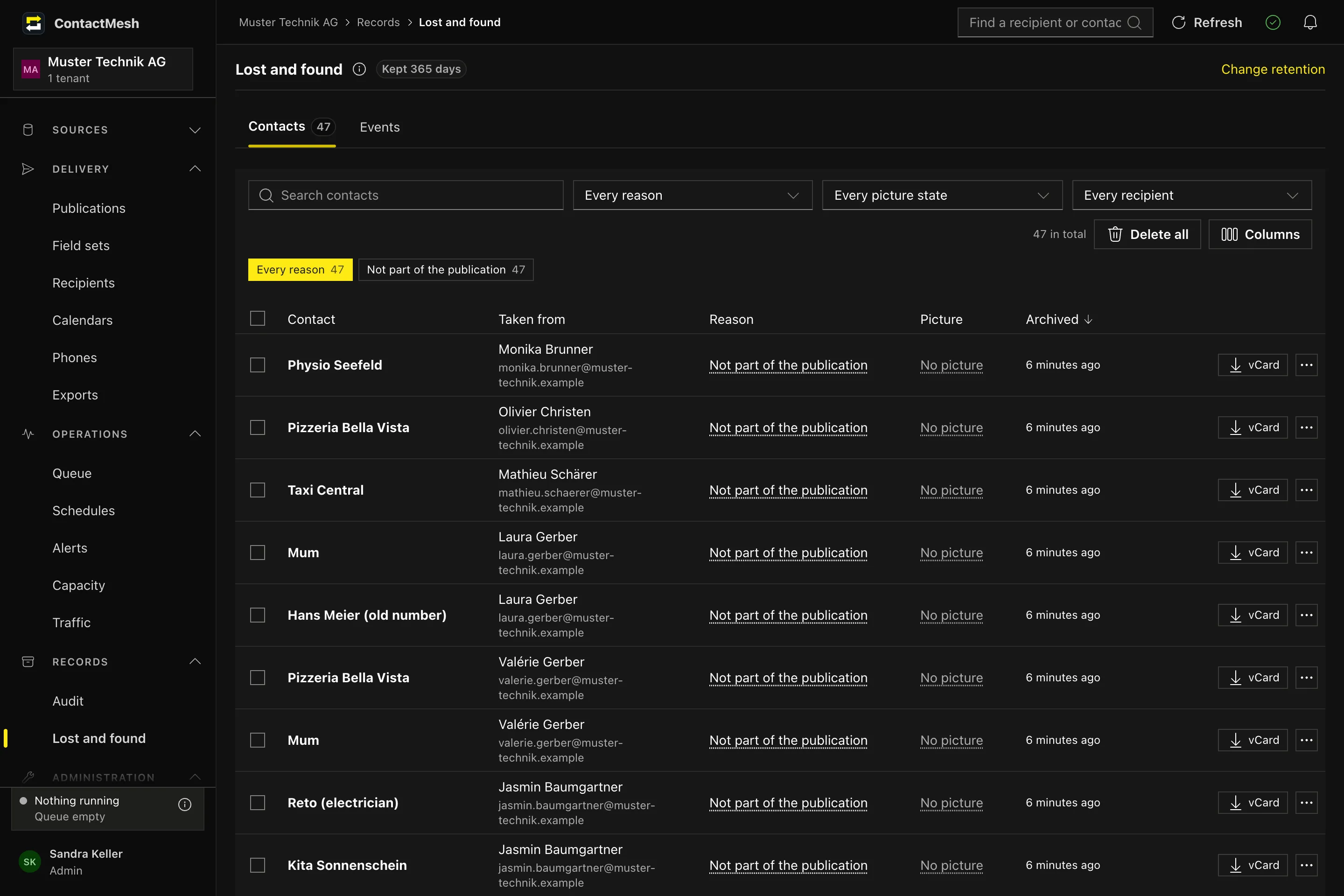
Anything ContactMesh removes from a managed folder that it did not write is archived here first, with the whole card, the mailbox it came from and the moment it was taken.
That covers the cases that matter: a recipient’s own contact filed in the managed folder, a card left by a previous tool that adoption would not claim, and everything in a folder being torn down during offboarding. The archive happens whatever the tenant’s archiving switch says, because a deletion that cannot be undone is not one this product hands out behind a button.
Each entry is the card as a vCard, and it is the only copy left anywhere. Entries are kept for one retention window, the same for the whole deployment rather than one per tenant, set on Settings under Retention by an Admin, and never shorter than 30 days; Change retention, in this page’s header beside how many days that is, goes there. Shortening it moves every expiry on this page at once, and the daily sweep is what deletes the entries. Until then they can be restored to the mailbox they came from, or exported.
The list is one line a card and one fact a column: Contact, Recipient and Recipient e-mail, the Publication whose delivery took the card away (a link while it exists; once deleted, its name with Deleted since in the tooltip), Archived, Reason, the card’s Company and E-mail, Picture, and Status while a card on the page has been asked back. Columns adds Phone, Folder and Expires and hides what you do not read; a table wider than the page scrolls sideways inside its card. Cards archived before this release did not record where they came from: their publication, source list and folder read Not recorded.
A row opens the card in a pane beside the list: its picture, every field it carried (names, company and job title, e-mail addresses, phone numbers, addresses, birthday, notes and the rest) and its archive: recipient, publication, source list, folder, reason, picture, when it was archived and when it expires, and its restore. vCard, Restore and Delete stand in the pane’s header, as in a row’s menu. Opening a card is recorded in the audit trail as Contact opened in lost and found, as a vCard download is, and a delete that takes the card closes its pane.
Ticking cards brings up a bar over them with Export, Restore and Delete selected. Restore puts the selected cards back in the mailbox they came from, in a folder of their own named Recovered contacts — never the managed folder, where the next reconciliation would remove them again. The dashboard only queues the request and the worker carries it out on its next pass, so a worker has to be running: without one the button says so and queues nothing. A request made while the deployment is paused waits for Resume all. Each card reads Restoring until it is back and Restored afterwards. One the worker could not restore is tried again a few times and then reads Failed, with the reason behind its “i”; Restore asks for it again.
Deletion from here is permanent and is guarded accordingly.
Delete all, beside the count, or Delete all matching while a filter is on, erases everything the current filters match, across every page, once you type back the count its dialog shows. If the archive changed while the dialog was open, nothing is deleted and the new count is shown.
Events
Section titled “Events”The Events tab keeps what a calendar check takes out of a recipient’s calendar, or writes over, when it is theirs and cannot be rebuilt:
- Taken out: an appointment the recipient put in a calendar ContactMesh delivers, when that calendar’s publication removes personal events. A recurring series and a meeting with attendees are never taken out: deleting a meeting would send its attendees a cancellation.
- Text overwritten: the recipient’s version of an event’s text, kept before the publication’s text is written back.
ContactMesh’s own events are never kept here: they come back from their source.
Each event is one line, the recipient’s e-mail in a column of its own, and is kept for the same retention window
as the contacts. Export hands it out as a calendar file (.ics)
that Outlook and every calendar app open. Restore asks the worker to write it into the recipient’s own calendar,
the one ContactMesh never manages, without anybody invited; the row reads Restoring and then Restored, as a
contact’s does. Delete removes it for good.
Erasing a person deletes the kept events whose subject or location names them, and keeps out the ones filed after it.