Running the service
Recipients
Every person the deployment writes to, and the state of their folders.
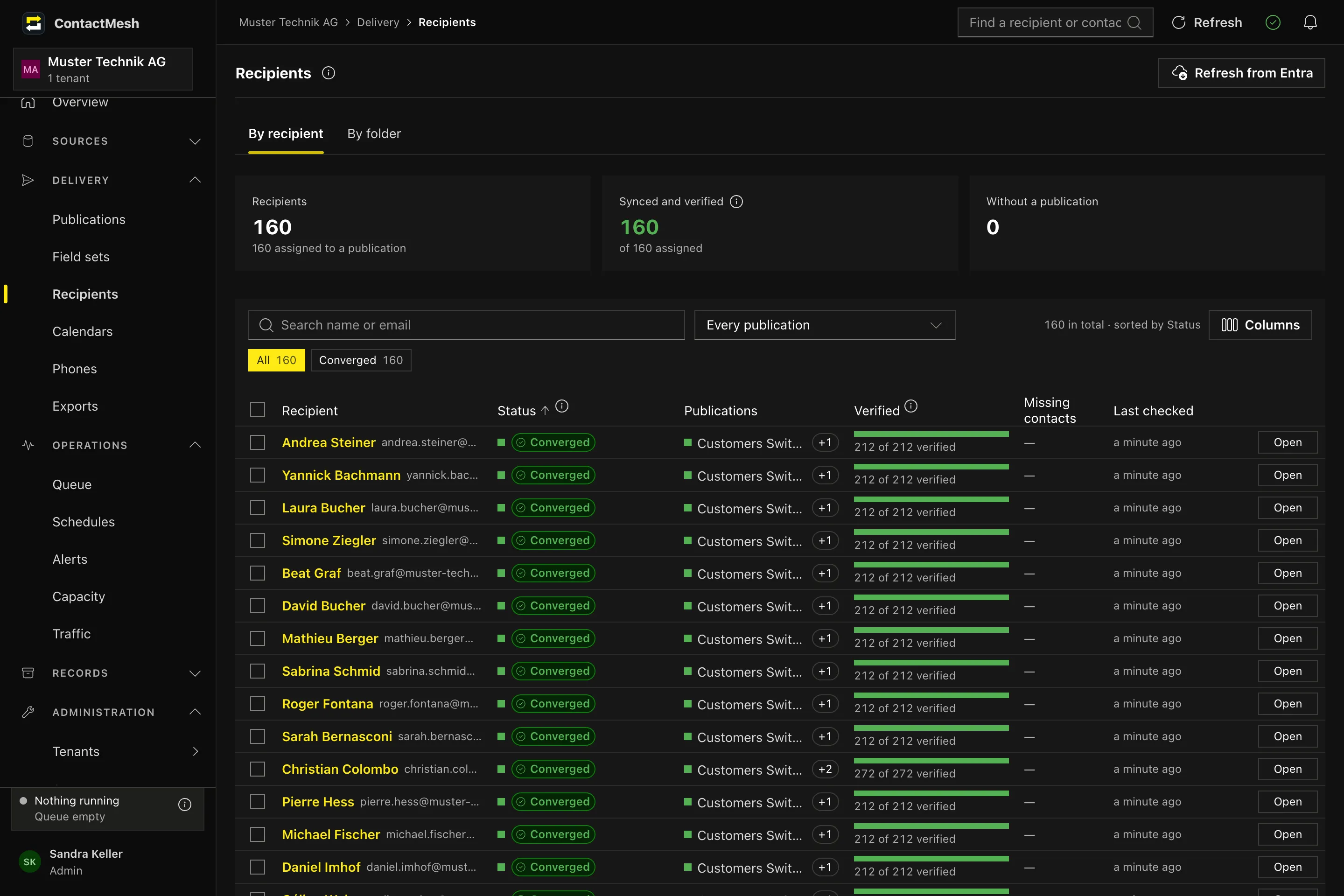
One row per person, with the folders ContactMesh maintains for them.
The counts distinguish three things that are easy to conflate:
- Desired — what the source and the field set say this person should hold.
- Delivered — what was written and the write succeeded.
- Verified — what a listing of their folder actually found.
- In folder — how many cards are in their managed folders altogether, ours or not. The difference between this and verified is the strays, the duplicates and the cards nobody here wrote. It reads not counted yet until a listing has counted the folder. When the folder was written to after that listing, the last count stays with its age and before the last write until the next listing.
In folder, Exposed folders and Queue start under Columns, so the default row fits a 1440 screen under every organisation; Status already says Fields exposed or Behind.
Each row names the publications that reach the person, each tagged with the state of the folders it put there; selecting a tag filters the table to that publication.
A person’s state is the worst of their folders. By folder lists every folder instead — one person in one publication per row, in that folder’s own state — with the same search, publication and state filters, and the state counts are then counts of folders. An archived publication’s folders are left out of both views, as they are on the Overview. Under All tenants both views name each row’s tenant beside the person.
Written repeatedly, beside the publication and hold filters, keeps the people and folders holding a card written more than six times in a day, whatever wrote it. It is offered while there are some, or while it is on. See Cards written repeatedly.
A row opens the person in a pane beside the table: what they should hold, what was delivered and what is missing, each folder with its state, when they were last checked, and Check changes and Reconcile all folders. Open its page in the pane leads to their own page, which adds what only applies to them, a tab each: Folders, Decisions, Changes, Calendars when a calendar reaches them, and Duplicates. There are the publications that reach them, the fields each one delivers, their local edits, their held deletions, and the last error against their mailbox with the code Microsoft returned.
Refresh from Entra reads a tenant’s people and groups again, for a new mailbox or a rename: the tenant selected at the top, or under All tenants one tenant or Every tenant, chosen from its menu. The worker reads it, and the button says Waiting for the worker… and Checking… until it has.
Eligibility
Section titled “Eligibility”Not everybody in a group can receive contacts. An account without a mailbox, a disabled account, a guest — these are excluded with the reason named, rather than failing repeatedly against a mailbox that does not exist. A calendar publication’s audience keeps to the same rule.
Recipients of calendars only
Section titled “Recipients of calendars only”A calendar publication for an Entra group makes a recipient of every member, whether or not a contact publication reaches them. Somebody who receives a calendar and no contacts is listed here like anybody else; their state reads No folders, which is true of their contacts, and their page lists the calendar on its Calendars tab. They count towards the licence once, as everybody does: see what counts.
Acting on many recipients at once
Section titled “Acting on many recipients at once”Tick recipients, or tick the page and then Select all n matching to take everyone the current search, state and publication filter matches. Ticked recipients stay selected across pages; all matching is dropped as soon as the filter changes, because it then describes somebody else. Under All tenants, all matching is every tenant’s people, and the dialog says Every tenant is included.
The toolbar above the table offers:
| Action | What it does | Who |
|---|---|---|
| Approve held deletions | Approves the held deletion set of every selected folder whose guard is holding one. | Admin |
| Release staged changes | Releases the staged plans of the selected recipients. | Operator |
| Book reconciliation | Books each folder for the scheduled reconciliation, which lists it in full at the configured pacing. | Operator |
| More — Pause, Resume, Retry failed, Repair again, Cancel queued work, Discard staged changes | The same verbs a folder offers on the recipient’s own page. | Operator |
| More — Give up on failed | Cancels failed work for good, whatever caused it, and a removal Exchange refuses to let run. Ticked recipients only, never all matching. | Operator |
Every action opens a dialog listing exactly the folders it would change — a paused folder, or one whose source list is disabled, is not offered an approval, a folder with nothing queued is not offered a cancel — and nothing is sent until it is confirmed. The rows shown are the rows sent: the list pages ten at a time and searches by name, address and folder, and the action takes every row of it, not the page in view. The selected folders it leaves out are under N folders left out, each with its reason — paused, access removed, source list disabled, not scheduled, or nothing to do.
An approval travels with the fingerprint of the set each row showed. A folder whose set changed in the meantime, stopped holding, was paused or had its source list disabled is not approved; the dialog stays open listing those folders with the reason, and Review changed fetches the changed ones afresh to be looked at again. Nothing is resubmitted by itself. The approval window stands once above the list: fifteen minutes, and fifteen more for each further batch of twenty folders, which the worker spends oldest first. Folders frozen by their source list’s guard are counted separately: those are approved on the source list.
Queue verbs answer per folder too. A folder whose recipient lost access is refused a resume or retry, and a booked reconciliation is refused where no schedule would run it. A folder its publication is not delivering to — a rollout wave not yet released, or a publication paused or not yet switched on — is refused a resume; a retry puts its failed work back but leaves it paused. The list and the recipient’s folder table name the reason beside Paused (wave not released, publication not delivering), and the folder’s switch stays disabled until the publication delivers.
Check without syncing, Check changes, Reconcile all folders, Full sync, resetting a folder and offboarding stay on the recipient’s own page; the pane offers the second and third too. Check changes and Reconcile all folders book the check for the worker’s next round, and each folder’s line shows it as due until it has run; Check without syncing is booked for the worker too. The others read or write mailboxes while the request waits, and a folder reset keeps its typed confirmation. A folder row’s … menu offers Reconcile for that folder alone, booked the same way, and its comparison page names the same two checks the same way. A folder reading Outside app scope offers Check access again there: the worker asks Exchange within a minute, and the row says when Exchange was last asked. A folder reading Keeps changing offers Repair again: it lets go of the cards a check stopped rewriting and books the check that repairs them; see Keeps changing. On the comparison page those cards read Exchange rewrites or Changed elsewhere instead of Differs, and every field that differs names the kind of change under its name, such as line breaks.
The three verbs that look at or write the folders are told apart by what they read:
| Verb | Reads | Writes | Leaves the folders |
|---|---|---|---|
| Check changes | Only what changed in each folder since the last check | A repair for each changed card it can judge | Never verified by it; an unknown card or a lost checkpoint turns it into a full listing in the same round |
| Reconcile all folders | Every folder in full, against the source | Only what differs | Verified: the only verb that can make a folder Converged |
| Full sync | Nothing from the mailbox | Every contact again, whatever our record says | Behind while the writes drain, Not verified until the listing the queue books has run, then verified |
Each answers what will stop it doing what it says. Through Pause all, or with no worker running, the toast says the check is held and why; in plan mode it says the check runs and that plan mode holds the repairs it finds. Full sync says how long after the last write the folders are verified, as Fill verification books it. More on when to use which is under What verified means.
On a recipient’s own page
Section titled “On a recipient’s own page”Check without syncing, under Staged changes on the Changes tab, reads every managed folder and stages the exact changes there. Staged work is durable — it survives a restart — and the worker never picks it up while it is held, so nothing reaches the mailbox until it is released; Discard cancels it.
The worker runs the check: the section reads Waiting for the worker…, then Checking…, until the plan is there, and a check that fails says why in its place. Pressing again meanwhile is the same check; it is refused while no worker is running and through Pause all.
The Decisions tab holds what waits on a person; while something does, a bar on every other tab says so, and Review opens it. Held deletions appears there as soon as a folder’s guard holds a set, with the count from the folder’s record; the names follow once the folder has been read, and the approval waits for them. Approving hands the set to the worker: the names are marked as being removed at once, and the panel follows the folder until the last of them is gone. If the set changed or the approval ran out first, the panel says so and shows the set the folder holds now.
Waiting changes, beside it, lists the contacts that would be created and those that would be updated wherever a folder of the recipient waits on a decision: a sign-off, a staged plan, an adoption, plan mode, or a held removal. Each row names the contact, the change, the folder and what holds it — Pause all, a folder’s pause, a source list switched off or the licence among them, and Queued only for what a worker will write in its turn, as beneath a held removal. It is read a page at a time and can be searched; the figures beside its title count every one. A folder that is only paused lists nothing here: its work waits for the switch, not for an answer. A folder’s compare page lists its own.
The Duplicates tab shows what the worker last found duplicated in one folder or all of them, with its age; a folder row’s Check for duplicates… opens it on that folder. Scan the folder books a new look for the worker — read-only, so it works in plan mode — and is an Operator’s. The findings name the cards in the recipient’s folder and are kept for 30 days, set on Settings under Retention as Duplicate scans. After that the folder reads Not looked at in the last 30 days until it is scanned again; a look still waiting or running is never cleared.
Unmatched contacts, on Decisions too, lists the cards adoption could not match with confidence. For each one, either overwrite the card already in the folder — the same card, with our values — or choose Write new contact to keep it and write a new contact beside it; Claim the fullest for n and New for all decide them all at once. Nothing is written or removed until a decision is applied. Where the publication removes unmanaged contacts, the second choice reads Write new, sweep card: a card nobody claims goes to the lost and found at the next reconciliation. The worker applies the decisions, all of them or none: the section reads Waiting for the worker…, then Applying the decisions…, and decisions it could not apply — a card another publication claimed in the meantime — say why and stay chosen.
Removing a recipient’s record
Section titled “Removing a recipient’s record”A recipient row stays after the person has gone: the membership refresh creates it and nothing else removes it. Remove record in the recipient’s page header, Admin only, deletes the recipient record with its directory photo, removed folder rows, the finished work and rollout entries for those folders, their recorded group memberships and any disabled individual assignment. Nothing in the mailbox is touched. Audit log entries, which keep the UPN, and lost-and-found copies taken from the mailbox are kept.
A folder that finished offboarding under a removal behaviour that keeps data still holds its cards, with restricted fields already stripped. Removing the record forgets those cards: they stay in the mailbox and are no longer managed. The dialog counts them before you confirm.
It is refused while anything of theirs is still in hand, and the dialog names which: a publication still delivering to them or still offboarding them, an enabled individual assignment, or work queued against their mailbox. Remove them from the audience and let offboarding finish. If something is writing the recipient at that moment, such as a membership refresh, the removal is refused with a request to try again. If the last membership refresh still found them in an Entra group, the dialog says so: the next refresh creates the record again.